


- 136
- 60
- NAS
- DS1817+, RS1221+, DS1522+
- Operating system
- Windows
- Mobile operating system
- Android
Hi,
I have Network printer/scanner Canon MAXIFY GX6040 and Synology RS 1221+ (DSM 7.2.1-69057 Update 5).
All is connected up through switch and Scanner sees folder son NAS just fine, and I had it setup that when I hit scan preset on my Canon scanner LCD i get PDF created directly on my NAS/Scan_Folder.
That worked like a charm for like 15 months but as of recently (I think as of latest Synology update month ago or so, can't' tell for sure since I've not scanned anything like for 2 months and then i needed it 2 days ago) it's not working any more.
Canon has its windows utility from which one you set scan folder and login credentials, and I've not changed anything there, but it just won't connect any more, says pass or login are wrong.
I thought it might be some Canon printer/scanner issue, so I've updated firmware on it, but it didn't help.
Then I changed the scan folder to my Workstation/Windows PC and that worked just fine. But changing it back to NAS then it can't go pass login stage .
.
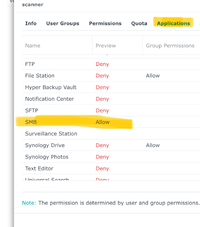
I tried to give Admin credentials and even created new user (scan) in Synology permissions, but neither worked.
I'm sure it uses SMB for this process and my Synology SMB min was SMB2 and max SMB3 but i've even tried to set minimum to SMB1 and nope, still no go..
Any Idea what Synology might be changed in their latest DSM update(s) to make it this problematic for Canon Printer/Scanner to scan to NAS?
Thanks
I have Network printer/scanner Canon MAXIFY GX6040 and Synology RS 1221+ (DSM 7.2.1-69057 Update 5).
All is connected up through switch and Scanner sees folder son NAS just fine, and I had it setup that when I hit scan preset on my Canon scanner LCD i get PDF created directly on my NAS/Scan_Folder.
That worked like a charm for like 15 months but as of recently (I think as of latest Synology update month ago or so, can't' tell for sure since I've not scanned anything like for 2 months and then i needed it 2 days ago) it's not working any more.
Canon has its windows utility from which one you set scan folder and login credentials, and I've not changed anything there, but it just won't connect any more, says pass or login are wrong.
I thought it might be some Canon printer/scanner issue, so I've updated firmware on it, but it didn't help.
Then I changed the scan folder to my Workstation/Windows PC and that worked just fine. But changing it back to NAS then it can't go pass login stage
.I tried to give Admin credentials and even created new user (scan) in Synology permissions, but neither worked.
I'm sure it uses SMB for this process and my Synology SMB min was SMB2 and max SMB3 but i've even tried to set minimum to SMB1 and nope, still no go..
Any Idea what Synology might be changed in their latest DSM update(s) to make it this problematic for Canon Printer/Scanner to scan to NAS?
Thanks
This post includes affiliate links. As an Amazon Associate, SynoForum.com may earn a commission if you make a purchase — at no extra cost to you.
It helps support our community! Learn more...


 .
.
