Install the app
How to install the app on iOS

Follow along with the video below to see how to install our site as a web app on your home screen.

Note: This feature may not be available in some browsers.

WD WD30EFRX(3TB) SMART error - reason to exchange it?

10
0
NAS
WDMyCloudMirror__WDMyCloudEX2Ultra
Operating system
  1. Linux
  2. Windows
Mobile operating system
  1. Android
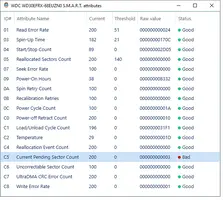
Hello, I get the “S.M.A.R.T C5, Current Pending Sector Count = 200” error (see pic). Is this a reason to exchange both of my 3TB hard discs (WD30EFRX). Thanks, -t
 

Attachments

  • smart_data1.webp
    smart_data1.webp
    39.3 KB · Views: 602
Last edited:
I had 3x WD drives fail, but until I removed them and ran placed in different computer, running their Windows software on them, I could not tell for certain they were bad....
2 died in 5-10 min of long test.. Last one died 30 or so min into test.... So with 2 different software's saying 3 are bad... One of them WD software... Replaced all 3.
Edit: the 2x WD 2’s were replaced with WD 4’s. 3+ years later gave NAS to Son-in-law, and as far as I know, it’s still running.
 
Upvote 0
I am wondering if this error can be fixed: “S.M.A.R.T C5, Current Pending Sector Count = 200”... Both drives have the same error, also strange. May be because they have same lifetime...
 
Upvote 0
Well, that's why I am writing it in a forum. I dont know, if those are serious errors and I should trash two 3TB drives or if I can live with it or if I can repair that. How do others handle it? If it would be the NAS system of a company, would they exchange the drive?
 
Upvote 0
If you have backup, and can live with limping on one drive, pull & test other….

If it were mine, I’d be searching drive sales…..
This way you know you are on new drives and can test removed ones at your leisure.
If bad, you dodged a bullet! If good, you have spares on shelf!
Win-Win!
 
Upvote 0
Ok, thank you Jan. But you would take this serious. Ignoring is not an option
 
Upvote 0
This sort of thing is not a: “Do Nothing and see what happens”. It’s decision time! Time IS of the essence! It’s either the drives…. Or, what’s controlling them. Either one is $$. You either get damn good quickly flipping a nickel, or, you do something. It’s really simple: Drives cost less than new NAS.
The more your data and time is worth, the less drives and NAS’s cost. Imagine your job is hinging on your data remaining accessible.
 
Upvote 0
Ok, thanks. Can you say something about the value 200 (Current Pending Sector Count = 200). Is this like, it could work for another 5 years or do we expect total failure in the next days
 
Upvote 0
Hopefully others will post. Once you get error prompts, It’s like playing the Lotto: you may win, today, tomorrow, or Never. Lose same!! Until you pull and test the drives under MFG’s software, you won’t get a definitive answer.

Many times you don’t get the warnings you already have received!! There is no definitive answer, except; “Maybe”.. depends on how much you value your data! and I’m being honest.
 
Upvote 0
Thank you Jan. I will replace the drives...and get to know whatever MFG's SW is
 
Upvote 0
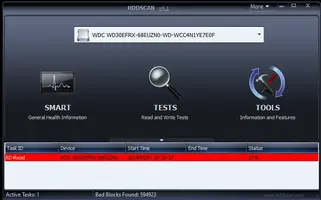
I did a test with HDDSCAN. After 12% of the scan, it already found 595000 bad sectors. Time to trash it?
 

Attachments

  • hdd.webp
    hdd.webp
    15.9 KB · Views: 44
Upvote 0
Last edited:
Drill 3 or 4 7/16” holes through it first….

Then recycle it!
😁
 
Upvote 0
How many bad sectors would be acceptable?
 
Upvote 0
Last edited:
Here: on first bad report: Watch it.
On second bad report: test it externally under MFG’s software:
On Pass: Test again! If pass twice: Re-Use!
On Fail: 3 or 4 7/16” ( or 13MM ) Holes drilled through drive, then recycle!

At work…. After holes, place in bucket of salt water overnight, then recycle! (I pointed out to Network Bean Counter's that this approach is Less Expensive than buying a drive shredder)!
 
Upvote 0
Thanks. Last question: What is MFG's software... couldnt find anything about it. That's why I used HDDSCAN.
 
Upvote 0

Create an account or login to comment

You must be a member in order to leave a comment

Create account

Create an account on our community. It's easy!

Log in

Already have an account? Log in here.

Popular tags from this forum

Similar threads

  • Question Question
Update. Disabled the hard drive and deleted the error logs and it’s not marked as healthy. Rebuilding the...
Replies
8
Views
170

Thread Tags

Tags Tags
None

Welcome to SynoForum.com!

SynoForum.com is an unofficial Synology forum for NAS owners and enthusiasts.

Registration is free, easy and fast!

Trending content in this forum

Back
Top