- 17
- 8
- NAS
- DS218+
- Operating system
- Windows
- Mobile operating system
- iOS
Follow along with the video below to see how to install our site as a web app on your home screen.
Note: This feature may not be available in some browsers.
Pin 2: GND (Ground)Nothing at all from the serial output tried reversing tx and rx confirmed ground etc. if I unplug and swap the tx and rx whilst connected to Putty I get lots of random characters which confirms that Putty is connected to the test lead ok.
Pin 2: GND (Ground)Nothing! just a green blinking cursor.
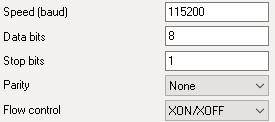
I tried the same as your settings as well as with flow control set to None![]()
yes tried the TX and RX in both orientations and confirmed ground as pin 2 with a multimeterPin 2: GND (Ground)
Pin 4: TXD (Transmit from NAS – connect to adapter's RXD)
Pin 6: RXD (Receive at NAS – connect to adapter's TXD)
Yes powered up fan connected new battery, Fan spins up possibly full speed? blue light flashes etc.I use Terra Term or Picocom on the linux command line as a terminal program.
You’ve turned it back on, right?
Otherwise, I'll be at the end of my rope here.
Strange, but now the adapter is definitely the right one. As I have already suggested, it is going to be an uphill battle.Yes powered up fan connected new battery, Fan spins up possibly full speed? blue light flashes etc.
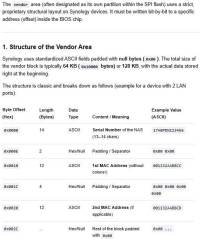
The serial numbers should be there too, but it’s not a big deal if they aren’t. You would see that in the Assistant.I have the PAT file from DSM_DS218_25556 which is identical to my extracted Bios file up to line 000f9770, (on the Synology file it stops at that line) so I assume this is the file I need but as it is identical to that point, does this mean it is not corrupted? there is lots after this and my serial number is visible but I cannot locate my MAC address starting to wonder if the processor is at fault or something else on the board such as the RAM?
We use essential cookies to make this site work, and optional cookies to enhance your experience.