


- Shop on Amazon
- See the product
As an Amazon Associate, we may earn commissions from qualifying purchases. Learn more...
- Drive Bays
- 6 bays
- Highlights
- Ultra-compact 6-bay 2.5" chassis
- 1 x 2.5GbE and 1 x 1GbE RJ-45 ports
- Upgradable memory capacity
The Synology FS200T is an ultra-compact, all-flash NAS aimed at enthusiasts and home or small office users who want fast, quiet storage in a minimal footprint. It fits six 2.5" SATA SSDs into a chassis roughly the same size as a 2-bay DS725+.
Hardware at a Glance
- Drive bays: 6 x 2.5" SATA SSD
- RAM: 4 GB DDR4 SODIMM (expandable to 8 GB)
- Networking: 1x 2.5GbE + 1x 1GbE (link aggregation and failover supported)
- USB: 2x USB 3.2 Gen 1
- Dimensions: 121 x 151 x 175 mm
- Warranty: 3 years standard, extendable to 5 years
Download Datasheet
Who Is This For?
The FS200T makes the most sense if you want all-flash performance without a large desktop NAS footprint, near-silent operation, fast local networking out of the box, and a full DSM platform in the smallest possible package.
It's not a cost-efficient primary storage device. Six SATA SSDs at any reasonable capacity will cost significantly more than equivalent spinning drives in a larger NAS. The value is in the form factor and silence, not raw storage per dollar.
Software
Runs DSM with the full Synology software stack — Drive, Photos, Active Backup, Hyper Backup, Snapshot Replication, Office, Chat, MailPlus, and Active Insight. Nothing unusual compared to other current-gen Synology devices.
Drive Compatibility
Synology recommends using drives from their compatibility list. On newer devices like the FS200T, this is increasingly important for full DSM functionality. Check the Synology Compatibility List before purchasing third-party SSDs.
For more information check the official site:
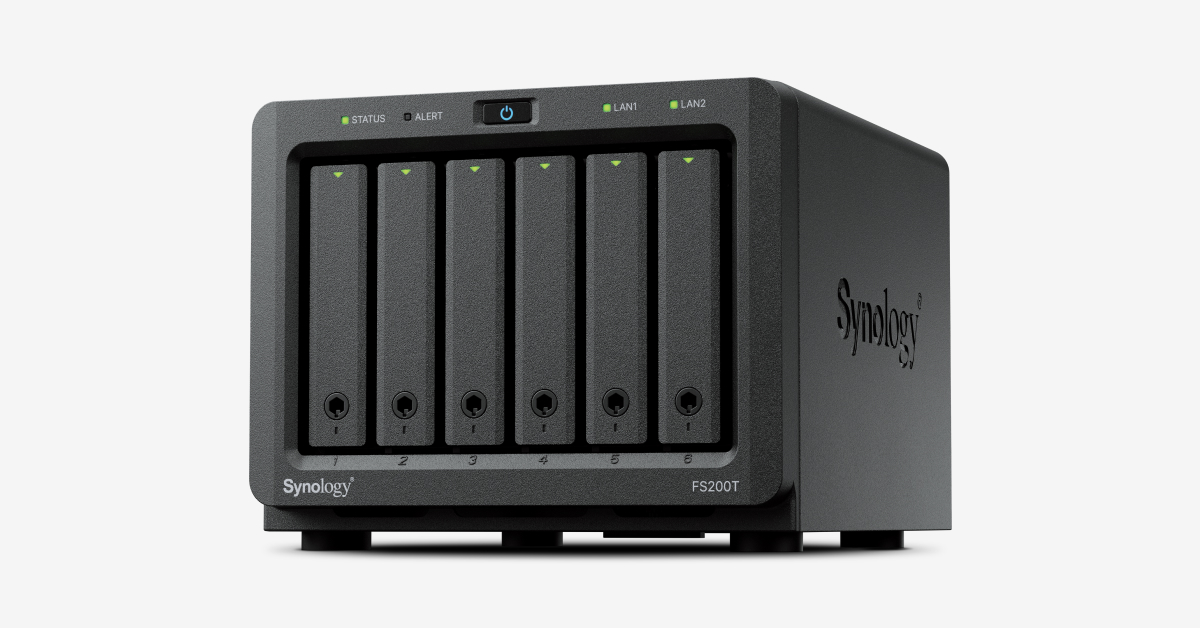

You can rate and review this NAS model or discuss it in the discussion thread.
This post includes affiliate links. As an Amazon Associate, SynoForum.com may earn a commission if you make a purchase — at no extra cost to you.
It helps support our community! Learn more...
- Which type of user are you?
- Space utilization
- Note
- The information on this page is for informational purposes only, see the NAS device model for details on the official website. We accept no liability for incorrect information.


