Install the app
How to install the app on iOS

Follow along with the video below to see how to install our site as a web app on your home screen.

Note: This feature may not be available in some browsers.

Info Best UPS Devices for Synology NAS

SynoMan

Administrator
Moderator
Founder
1,574
900
www.synoforum.com
NAS
DS720+, DS418play
Router
  1. RT2600ac
  2. MR2200ac
Operating system
  1. macOS
Mobile operating system
  1. iOS
Last edited:
Choosing the right uninterruptible power supply (UPS) for your Synology NAS is essential for protecting your data from unexpected power outages and maintaining long-term system stability.

A properly sized UPS allows your NAS to shut down safely during outages while protecting it from power surges, brownouts, and voltage fluctuations.

Recommended UPS Capacity​


- 1–2 bay NAS: 500–850VA (300–500W)
Suitable for small NAS units, router, and possibly a desktop PC.

- 4–8 bay NAS: 1000–1500VA (600–900W)
Recommended for multi-drive setups and additional networking equipment.

- 8–12 bay NAS / Rackmount models: 1500–3000VA (900W+)
Ideal for larger systems, expansion units, or multiple connected devices.

Always check the Watt (W) rating in addition to VA. Watt capacity determines how much real load the UPS can support.

Recommended UPS Models​

Some links may be affiliate links. This does not increase the price for you and helps support the forum.


Why Pure Sine Wave Matters​

Many modern Synology NAS models use active PFC power supplies. For best compatibility and stable operation, consider:
  • Line-interactive UPS models
  • Pure sine wave output, especially for larger or rackmount NAS systems

Synology Compatibility​

Most Synology NAS models support USB UPS monitoring and can automatically perform a safe shutdown when connected via USB.

Before purchasing, you can verify compatibility here:
Synology UPS Compatibility List

Note: Many compatible UPS models work perfectly even if they are not listed in Synology’s official database.

Community Recommendations​

From forum members:


We will continue updating this guide based on real-world feedback from the community.

If you are using a UPS with your Synology NAS, please share:

  • Exact UPS model
  • NAS model
  • Connected load (NAS only or additional devices)
  • Runtime during outages

Verified, community-tested models will be added to this guide.
 

This post includes affiliate links. As an Amazon Associate, eReadersForum.com may earn a commission if you make a purchase — at no extra cost to you.
It helps support our community! Learn more...

Last edited:
Not having any issues to date with 6x CyberPower 1500VA non-sine wave UPS/AVR units bought in 2015/16.
Used on: 718+, 720+, 2600 routers, Direct TV Satellite + Ethernet system feeding 4x rooms, Dolby Surround System, 3x 4K ROKU’s, 4x TV’s 32” 32” 40” 55”, GB & POE Switches, 2x laptops, Supermicro 2008 server as video edit system, and broadcast video equipment! Loads vary from 150-700W. UPS Just covers the 30 seconds from failure to generator switchover, and brief outages and sags.
 
Just want to +1 for the point above re: battery life. We had a power outage last night which my CyberPower UPS should have handled, however I got an ‘abnormal shutdown’ message from my DS220+.

On checking the UPS settings in DSM Control Panel I think this was because I had the ‘time to wait until shutdown’ set to ‘until low battery’ and I guess the low battery level was very close to ‘no battery’.

I’ve changed this setting to ‘15 minutes’ which hopefully is long enough to survive a brief blip it also short enough for the UPS to keep sufficient power to shutdown the NAS gracefully.
 
I just set up a CyberPower ST625U for my DS218+. Relatively compact and affordable and it has the USB port to communicate with the NAS. All good.
 
APC (Schneider Electric) 'SMT' series UPS have served us well for many years. Pure Sine-Wave, Automatic Voltage Regulation and a remote cloud-based monitoring feature that provides automatic notifications, firmware updates, and advanced support services. Integrates flawlessly with DSM.

APC (Schneider Electric) 'SMX' (extended run time) served us well in one instance where availability during frequent multi-hour outages was required. The SMX series accommodates additional battery packs to extend runtime. Also integrates flawlessly with DSM.
 
Last edited:
I have seen issues where a weld between battery cells opens up, causing the UPS program to crash due to low battery voltage (be it a 1 or 2 battery unit).... That type of failure can 'heal' itself, and that Battery (Now with no load), "Heals" itself enough to start UPS program up again on the AC voltage supplied....... But Now you have a time bomb! That weld can and will open up under load.... But also, because of the UPS program (ANY MFG unit!) just re-booted.... IT DOESN'T KNOW that this just happened.... So if you look at UPS, you'd think all is well -- when it's not!

I added a simple plug in device: a 1 Bit relay Memory, that when this occurs... UPS Fails, but re-starts... It flashes an LED warning you that this type of failure has just occurred... I've 10 of these in service for 3-5 years... On my 6x UPS's and made 4 for friends.... They have done their job! They can't tell you that a battery weld is About to fail..... But warn you the First Time it happens! "Service UPS NOW!" (Cause you need to replace batteries!). I've posted schematic here before, not many parts, nothing exotic, a simple 'afternoon project'... If you'd want it. PM me and I'll send it..;)
 
Along with UPS, consider including mention of non-MOV (non-self-destructive) surge protectors, Zero Surge, Brick Wall and SurgeX

The technology used in these devices absorbs and dissipates surges through an inductor/resistor network. They don't wear out from surges. And they don't leak electrical noise to ground. They can suppress lightening-induced surges or power line spikes without failing - and without requiring replacement. They will provide a high level of protection for decades. OFC, DSM compatibility is not an issue, here.
 
I only consider sin wave units. Not simulated sin wave but actual sine wave units. Many of the above suggestions are not sine wave units, and I absolutely would not use them for your prime computer or server nor high end stereo equipment. For most other things non sinewave is fine. Obviously YMMV.

5 recommendations follow for various medium to large synology/server stations. If you are looking for JUST a synology NAS UPS you can go with smaller. But I bet most of you will be looking to UPS at least your cable modem, router, synology and maybe one or two other pieces of network/computer "plumbing" so 1500va is probably a good amount to keep you through long blackout scenarios.

The CyberPower one with 1000W is a very nice unit. I've used them for nearing 20 years, although the previous 1500va unit was only 900W. If you also run a laser printer on the same UPS, the extra wattage keeps it from beeping on warmup.

(1) 1500va/1000w CyberPower:

(2) I also have this 1500va/900w APC for my TV/game console, it's ok. I got it on super sale, but it generally sells for more than the 1000w CyberPower, and I think the Cyberpower is better overall.

(3) For rack mounted, I found this great 1U sinewave version (only 900w but works well in a small rack):

(4) If you need 2000va/1600w for a lot more hardware, need a non rack version, I've been using this and it's been ok. Haven't tested if the Synology can interface with its USB though:

What I like about the above unit is it's relatively light for its power capacity. The unit below weighs like it has a captured black hole inside of it.

(5) If you need 2000va/2000W this is the best unit, by far, that I've found and you can use an adapter to use it in a regular wall outlets (anything more than this and you need a special big amp/volt plug like for a dryer):

The price on it has gone nuts. I think I got it for around $650 several years ago. Super solid 2U unit with a lot of juice.
 

This post includes affiliate links. As an Amazon Associate, eReadersForum.com may earn a commission if you make a purchase — at no extra cost to you.
It helps support our community! Learn more...

Last edited:
I used to think the same about non sine wave units. Some switching supplies were not happy with them years ago (1970's-80's). The "Clean Sine Wave" Necessity... (Have you ever examined your AC power on a high bandwidth Oscilloscope? UGLY!).. But I believe over time & better inherent designs on both sides of the coin have negated this for the most part, and I have changed my opinion of the necessity of using them exclusively....
In my travels - I’ve seen non sine wave UPS at many places. I Have 6 of them myself, powering Recent IT gear as well as stuff from early 2000's, and old broadcast video gear, some of the most persnickety devices. Analog and digital video & audio & monitoring, SD or HD: no problem! have not had an issue with the 6 since their purchase in 2015/16, and to my surprise.... they seem to show no degrading over time - as they age - with fresh batteries! That was un-expected... and something I will keep my eye on...

I don’t think it matters any more, (Sine Wave) but if funds are available, and someone else is paying, why not?
 
Last edited:
Almost all modern electronics use Active Power Factor Correction (PFC) in their power supply. Active PFC is efficient, but it expects a clean sine wave. With a non-sine wave UPS, the PC or NAS power supply's PFC circuits can misfire, leading to buzzing or whining under load, higher heat and stress on components, or even failing to work when on UPS battery. A google search on "Active PFC" can give you a deep dive if interested.

Edit: As a practical matter, some Active PFC power supplies are more tolerant vs. others - and some non-sine wave UPS produce a better approximation of sine wave vs. others. So some combinations of power supplies and non-sine wave UPS will function while others will fail. Most combinations will fall into the murky middle of "good enough" to work; but ultimately subject to additional risk.
 
As an aside... For routers, modems, Security Cameras, telephones, LED lights and other lower powered devices, the Shanqiu Mini UPS Battery Backup Uninterruptible Power Supply provides Direct Current (DC) using 5-volt USB and 12-volt coaxial connectors with a set of adapters. It supports our RT6600ax router and ARRIS cable modem at the same time. This is a relatively inexpensive way to keep Internet connectivity alive during an outage. However, it would not be suitable for devices containing hard drives, since there is no UPS signaling.

51R3mUlj1SL._AC_SL1010_.jpg
 

This post includes affiliate links. As an Amazon Associate, eReadersForum.com may earn a commission if you make a purchase — at no extra cost to you.
It helps support our community! Learn more...

Last edited:
that does look like an interesting device..... For DC powered units!

With whole house Generator.... USB connections are not used here at all..... 30 seconds after power loss I'm on Generator power.. However, if it is a multi days long outage, (As Helene was!) I DID then have to go around and shut down NAS's manually, but then I didn't have Internet for 2-3 weeks...
 
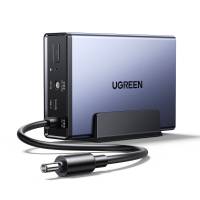
Our neighbors at UGREEN are now offering a DC-In/Out NAS UPS for $100. This is a brilliant approach that eliminates the need for DC (battery) to AC conversion, as well as power switching capability within the UPS. It simply provides a battery pack that's always online, along with minimal electronics to manage battery charging and provide a clean shut-down. The UGREEN NAS UPS is connected between the NAS' external power supply and the NAS, itself. It provides signaling via a USB connection to facilitate an orderly shutdown of the NAS. No sine wave issues here!

Would anyone be in a position to test this UPS with potentially compatible Synology NAS, such as the DS225+ and its predecessors???

1_46ecce3d-2866-49ad-9b2a-54e30887c7e7_2048x2048.jpg
 
Last edited:
For 12Volt devices, I agree with Mr. Bear. It is a novel approach I would consider.
Obviously not all devices run on 12v, and for them. AC Voltage is only option.
I have 6 UPS’s for 5 in service locations, I always have a hot spare! So I’m ‘set in my ways’: which involves a whole house generator, so I don’t bother with USB connections, either.
 
Last edited:
As a follow up to this: for those of you with whole house generators, that device introduces an altogether different set of variables to the whole idea!
The Factory trained serviceman, when I asked about its sine wave vs _____ wave capability from electronics….. Not only did our Generac 20KW generator get a firmware update, he spent time adjusting the LP gas regulator, so generator motor could quickly react to load changes like AC compressors and ranges. Prior to all this generator tweaking my multiple CyberPower 1500 UPS “AVR” systems would kick in occasionally while on generator. Not switch over to UPS, but AVR indicator would flash. After the generator tweaks: firmware & LP regulator tweak nary a peep from AVR!
It all is interconnected!
 
Our neighbors at UGREEN are now offering a DC-In/Out NAS UPS for $100. This is a brilliant approach that eliminates the need for DC (battery) to AC conversion, as well as power switching capability within the UPS. It simply provides a battery pack that's always online, along with minimal electronics to manage battery charging and provide a clean shut-down. The UGREEN NAS UPS is connected between the NAS' external power supply and the NAS, itself. It provides signaling via a USB connection to facilitate an orderly shutdown of the NAS. No sine wave issues here!

Would anyone be in a position to test this UPS with potentially compatible Synology NAS, such as the DS225+ and its predecessors???

View attachment 28476
I bought one of these with my ugreen nas, works a treat. Did an orderly shutdown of the nas during a recent 50min power outage
 
Choosing the right uninterruptible power supply (UPS) for your Synology NAS is essential for protecting your data from unexpected power outages and maintaining long-term system stability.

A properly sized UPS allows your NAS to shut down safely during outages while protecting it from power surges, brownouts, and voltage fluctuations.

Recommended UPS Capacity​


- 1–2 bay NAS: 500–850VA (300–500W)
Suitable for small NAS units, router, and possibly a desktop PC.

- 4–8 bay NAS: 1000–1500VA (600–900W)
Recommended for multi-drive setups and additional networking equipment.

- 8–12 bay NAS / Rackmount models: 1500–3000VA (900W+)
Ideal for larger systems, expansion units, or multiple connected devices.


Recommended UPS Models​

Some links may be affiliate links. This does not increase the price for you and helps support the forum.


Why Pure Sine Wave Matters​

Many modern Synology NAS models use active PFC power supplies. For best compatibility and stable operation, consider:
  • Line-interactive UPS models
  • Pure sine wave output, especially for larger or rackmount NAS systems

Synology Compatibility​

Most Synology NAS models support USB UPS monitoring and can automatically perform a safe shutdown when connected via USB.

Before purchasing, you can verify compatibility here:
Synology UPS Compatibility List

Note: Many compatible UPS models work perfectly even if they are not listed in Synology’s official database.

Community Recommendations​

From forum members:


We will continue updating this guide based on real-world feedback from the community.

If you are using a UPS with your Synology NAS, please share:

  • Exact UPS model
  • NAS model
  • Connected load (NAS only or additional devices)
  • Runtime during outages

Verified, community-tested models will be added to this guide.
UPS: APC Back-UPS XS 1400U
NAS: Syno 423
Load (nas plus others via NUT): 16%
Runtime: 35min
 

This post includes affiliate links. As an Amazon Associate, eReadersForum.com may earn a commission if you make a purchase — at no extra cost to you.
It helps support our community! Learn more...
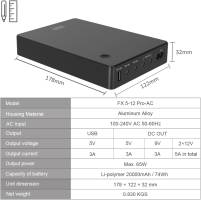
I bought one of these with my ugreen nas, works a treat. Did an orderly shutdown of the nas during a recent 50min power outage
Edit: Note that this is a 20 volt in/out and not 5 volt as mentioned by others
 

Create an account or login to comment

You must be a member in order to leave a comment

Create account

Create an account on our community. It's easy!

Log in

Already have an account? Log in here.

Welcome to SynoForum.com!

SynoForum.com is an unofficial Synology forum for NAS owners and enthusiasts.

Registration is free, easy and fast!

Trending content in this forum

Back
Top