- 4
- 1
- Router
- RT2600ac
- MR2200ac
- RT6600ax
- Operating system
- macOS
- Mobile operating system
- iOS
I was told by Synology a few weeks ago "I have inspected the Debug Log from ticket #xxx and have found that there is corruption in the Router's configuration. The corruption is causing packet loss on Wi-Fi networks, and causing an over-utilization of RAM." I was asked to perform a hard-reset (and no restore from backup) and then was told
"/proc/meminfo is showing high Memory utilization, and that the Router is using a small amount of Swap RAM, which may cause the Router to run a bit slower than expected.".
They then suggested I then do a factory reset i.e. " Router and open Control Panel>System, and expand the "Configuration Backup and Restore" button."
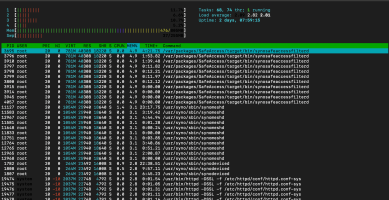
What is everyone seeing their configuration and memory utilization? Im only running Safe Access and here's my output from meminfo and top below. Is there a known patch for this or what could be happening here? Doing a hard-reset I would think is stronger than a factory-reset but not sure if I have to do this ALL over again! My system appears to be running fine but what is the norm for memory/RAM utilization on the RT6600ax? Loadavg is low but I do see that MemFree is 824Mb and free is only 82Mb BUT 223Mb cached. So what should this look like really? If I start adding packages e.g. threat prevention for example am I basically tapped out and unstable?
MemTotal: 824612 kB
MemFree: 82384 kB
MemAvailable: 261088 kB
Buffers: 31856 kB
Cached: 223148 kB
SwapCached: 2528 kB
Active: 218996 kB
Inactive: 156520 kB
Active(anon): 54620 kB
Inactive(anon): 67676 kB
Active(file): 164376 kB
Inactive(file): 88844 kB
Unevictable: 0 kB
Mlocked: 0 kB
SwapTotal: 262140 kB
SwapFree: 223748 kB
Dirty: 228 kB
Writeback: 0 kB
AnonPages: 118668 kB
Mapped: 49272 kB
Shmem: 1784 kB
Slab: 265920 kB
SReclaimable: 31188 kB
SUnreclaim: 234732 kB
KernelStack: 4272 kB
PageTables: 4448 kB
NFS_Unstable: 0 kB
Bounce: 0 kB
WritebackTmp: 0 kB
CommitLimit: 674444 kB
Committed_AS: 647472 kB
VmallocTotal: 258998208 kB
VmallocUsed: 0 kB
VmallocChunk: 0 kB
CmaTotal: 0 kB
CmaFree: 0 kB
"/proc/meminfo is showing high Memory utilization, and that the Router is using a small amount of Swap RAM, which may cause the Router to run a bit slower than expected.".
They then suggested I then do a factory reset i.e. " Router and open Control Panel>System, and expand the "Configuration Backup and Restore" button."
What is everyone seeing their configuration and memory utilization? Im only running Safe Access and here's my output from meminfo and top below. Is there a known patch for this or what could be happening here? Doing a hard-reset I would think is stronger than a factory-reset but not sure if I have to do this ALL over again! My system appears to be running fine but what is the norm for memory/RAM utilization on the RT6600ax? Loadavg is low but I do see that MemFree is 824Mb and free is only 82Mb BUT 223Mb cached. So what should this look like really? If I start adding packages e.g. threat prevention for example am I basically tapped out and unstable?
MemTotal: 824612 kB
MemFree: 82384 kB
MemAvailable: 261088 kB
Buffers: 31856 kB
Cached: 223148 kB
SwapCached: 2528 kB
Active: 218996 kB
Inactive: 156520 kB
Active(anon): 54620 kB
Inactive(anon): 67676 kB
Active(file): 164376 kB
Inactive(file): 88844 kB
Unevictable: 0 kB
Mlocked: 0 kB
SwapTotal: 262140 kB
SwapFree: 223748 kB
Dirty: 228 kB
Writeback: 0 kB
AnonPages: 118668 kB
Mapped: 49272 kB
Shmem: 1784 kB
Slab: 265920 kB
SReclaimable: 31188 kB
SUnreclaim: 234732 kB
KernelStack: 4272 kB
PageTables: 4448 kB
NFS_Unstable: 0 kB
Bounce: 0 kB
WritebackTmp: 0 kB
CommitLimit: 674444 kB
Committed_AS: 647472 kB
VmallocTotal: 258998208 kB
VmallocUsed: 0 kB
VmallocChunk: 0 kB
CmaTotal: 0 kB
CmaFree: 0 kB
This post includes affiliate links. As an Amazon Associate, SynoForum.com may earn a commission if you make a purchase — at no extra cost to you.
It helps support our community! Learn more...