Install the app
How to install the app on iOS

Follow along with the video below to see how to install our site as a web app on your home screen.

Note: This feature may not be available in some browsers.

blackvoid NGINX proxy manager

NGINX proxy manager

Guess this article was one long overdue considering how many Docker containers I run and a decent amount of those are running via reverse proxy.

Considering that I run Docker on Synology NAS, I used the built-in reverse proxy feature for years for several reasons. It was built in, it offered enough options out of the box, and I was lazy to run my separate one.

Well as it turns out, there are some solutions out there that require several features inside your reverse proxy to make them run correctly. This was the main reason why I made the switch to NGINX proxy manager.

Let's see how to run your version in parallel to your Synology NAS one.

Continue reading...
 
This is spot on! It is not possible get the real ip with a bridge network.
Tried to use NPM with macvlan networking and now I get "502 bad gateway" when I forward the ports.
NPM GUI is accessible with its dedicated IP:81 in macvlan.
Tried 2 proxy hosts and both were green in the interface but trying to access them is giving "502 bad gateway".
Back to Syno built-in reverse proxy with custom config files again :).
 
Should work, as long the IP is not the DS ip. Remember: macvlan child interfaces (in the container) are not allowed to communicate with the parent interface (Diskstation) .
 
Does NPM reverse report “online” status for that host?

If it’s green then reverse configuration is not the problem 99%
Yes it is green “online status” but it is not working as suppose to be. I’ve also tried a clean install with a macvlan network and a npm-bridge as explained here:

but also no succes. Also tried to add a A record to the DNS Server but that didn’t make a differenc.
So I ran out of ideas.
 
Last edited:
Is any of you affected by these issues:
- trying to login to NPM for the first time gives back "Bad Gateway"
- logs in NPM show
Code:
app_1  | [1/2/2021] [3:50:43 PM] [Global   ] › ✖  error     ER_ACCESS_DENIED_ERROR: Access denied for user 'npm'@'172.18.0.3' (using password: YES)
 
Is any of you affected by these issues:
- trying to login to NPM for the first time gives back "Bad Gateway"
- logs in NPM show
Code:
app_1  | [1/2/2021] [3:50:43 PM] [Global   ] › ✖  error     ER_ACCESS_DENIED_ERROR: Access denied for user 'npm'@'172.18.0.3' (using password: YES)
Not the same error but I'm seeing these errors:
Code:
2021/05/16 13:21:34 [error] 264#264: *1 connect() failed (111: Connection refused) while connecting to upstream, client: 127.0.0.1, server: nginxproxymanager, request: "GET /api/ HTTP/1.1", upstream: "http://127.0.0.1:3000/", host: "127.0.0.1:81"
2021/05/16 13:21:39 [error] 264#264: *3 connect() failed (111: Connection refused) while connecting to upstream, client: 127.0.0.1, server: nginxproxymanager, request: "GET /api/ HTTP/1.1", upstream: "http://127.0.0.1:3000/", host: "127.0.0.1:81"
2021/05/16 13:21:45 [error] 262#262: *5 connect() failed (111: Connection refused) while connecting to upstream, client: 127.0.0.1, server: nginxproxymanager, request: "GET /api/ HTTP/1.1", upstream: "http://127.0.0.1:3000/", host: "127.0.0.1:81"
2021/05/16 13:21:51 [error] 264#264: *7 connect() failed (111: Connection refused) while connecting to upstream, client: 127.0.0.1, server: nginxproxymanager, request: "GET /api/ HTTP/1.1", upstream: "http://127.0.0.1:3000/", host: "127.0.0.1:81"
2021/05/16 13:21:56 [error] 265#265: *9 connect() failed (111: Connection refused) while connecting to upstream, client: 127.0.0.1, server: nginxproxymanager, request: "GET /api/ HTTP/1.1", upstream: "http://127.0.0.1:3000/", host: "127.0.0.1:81"
2021/05/16 13:22:02 [error] 265#265: *11 connect() failed (111: Connection refused) while connecting to upstream, client: 127.0.0.1, server: nginxproxymanager, request: "GET /api/ HTTP/1.1", upstream: "http://127.0.0.1:3000/", host: "127.0.0.1:81"
2021/05/16 13:22:07 [error] 265#265: *13 connect() failed (111: Connection refused) while connecting to upstream, client: 127.0.0.1, server: nginxproxymanager, request: "GET /api/ HTTP/1.1", upstream: "http://127.0.0.1:3000/", host: "127.0.0.1:81"
2021/05/16 13:22:13 [error] 265#265: *15 connect() failed (111: Connection refused) while connecting to upstream, client: 127.0.0.1, server: nginxproxymanager, request: "GET /api/ HTTP/1.1", upstream: "http://127.0.0.1:3000/", host: "127.0.0.1:81"
2021/05/16 13:22:18 [error] 265#265: *17 connect() failed (111: Connection refused) while connecting to upstream, client: 127.0.0.1, server: nginxproxymanager, request: "GET /api/ HTTP/1.1", upstream: "http://127.0.0.1:3000/", host: "127.0.0.1:81"

In the log of Docker GUI I see this:
Code:
[5/16/2021] [1:22:21 PM] [Global   ] › ℹ  info      Backend PID 229 listening on port 3000 ...
stdout
11:22:26

I have Adguard running on port 3000, but I have not setup any "3000" port for NPM.
 
I have Adguard running on port 3000, but I have not setup any "3000" port for NPM.
I saw this one also, I have grafana running on port 3000 instead, but it worries me as well.

Anyway, I figured out how to solve the "access denied error". I had to mount a path with a config.json file

Code:
- /volume1/docker/nginx/config/config.json:/app/config/production.json

{
  "database": {
    "engine": "mysql",
    "host": "NASIP",
    "name": "npm",
    "user": "npm",
    "password": "password",
    "port": 3306
  },
 
I saw this one also, I have grafana running on port 3000 instead, but it worries me as well.

Anyway, I figured out how to solve the "access denied error". I had to mount a path with a config.json file

Code:
- /volume1/docker/nginx/config/config.json:/app/config/production.json

{
  "database": {
    "engine": "mysql",
    "host": "NASIP",
    "name": "npm",
    "user": "npm",
    "password": "password",
    "port": 3306
  },
But mine Adguard is running via a macvlan network so port 3000 should be free for NPM. I don't see anything else in Docker that runs on port 3000. Maybe it's a reserved port for DSM?
 
2021/05/16 13:22:13 [error] 265#265: *15 connect() failed (111: Connection refused) while connecting to upstream, client: 127.0.0.1, server: nginxproxymanager, request: "GET /api/ HTTP/1.1", upstream: "http://127.0.0.1:3000/", host: "127.0.0.1:81"
I would interpret this as: "incomming traffic on container port 81 on 127.0.0.1 can not be forwarded to the upstream application on port 3000 on 127.0.0.1, because the connection is refused (From the upstream app)."
 
Last edited:
I would interpret this as: "incomming traffic on container port 81 on 127.0.0.1 can not be forwarded to the upstream application on port 3000 on 127.0.0.1, because the connection is refused (From the upstream app)."
Okay, but still I can't get it to work. My Online status is green for the proxy host, no errors in the logs but still I get a 403 error pag instead of the actual one. If I revert back to Synology RP it works. I don't get it how something So simple wouldn't work for me!?
 
Without knowing your exact setup, the best thing I can do is to interpret what you share.

Actualy, it would be great to see the nginx configuration file npm generates for the service where the rp rules are not working. Haven't used npm myself. Though, nginx configurations are actualy not that impossible to understand :)
 
Without knowing your exact setup, the best thing I can do is to interpret what you share.

Actualy, it would be great to see the nginx configuration file npm generates for the service where the rp rules are not working. Haven't used npm myself. Though, nginx configurations are actualy not that impossible to understand :)
Hi,
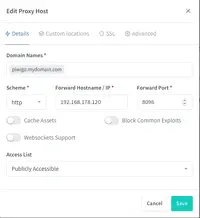
This is the RP file generated by NPM
Code:
# ------------------------------------------------------------
# piwigo.mydomain.com
# ------------------------------------------------------------


server {
  set $forward_scheme http;
  set $server         "192.168.178.120";
  set $port           8096;

  listen 80;
#listen [::]:80;

listen 443 ssl http2;
#listen [::]:443;


  server_name piwigo.mydomain.com;


  # Custom SSL
  ssl_certificate /data/custom_ssl/npm-1/fullchain.pem;
  ssl_certificate_key /data/custom_ssl/npm-1/privkey.pem;


    # Force SSL
    include conf.d/include/force-ssl.conf;


  access_log /data/logs/proxy_host-1.log proxy;


  location / {


    # Proxy!
    include conf.d/include/proxy.conf;
  }


  # Custom
  include /data/nginx/custom/server_proxy[.]conf;
}
 
I should have read more. The shared config would indicate a problem with the domain piwigo.mydomain.com. The real declaration of the rules is done in the "include" files.

Though, the access logs earlier indicated a problem with the nginxproxymanager itself. I guess this is where your real problem is, right? Aren't there any application logs appart of the access logs?
 
I should have read more. The shared config would indicate a problem with the domain piwigo.mydomain.com. The real declaration of the rules is done in the "include" files.

Though, the access logs earlier indicated a problem with the nginxproxymanager itself. I guess this is where your real problem is, right? Aren't there any application logs appart of the access logs?
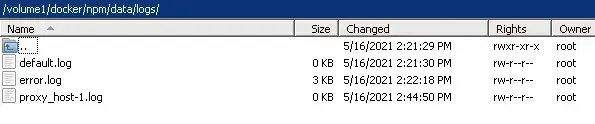
These are all the log files in NPM as you can see 2 are empty and the one has the data I provided earlier.
[automerge]1621168256[/automerge]
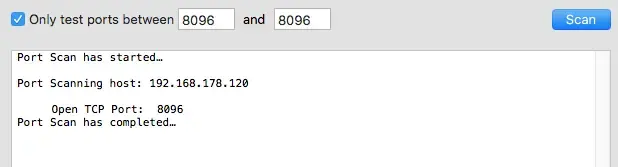
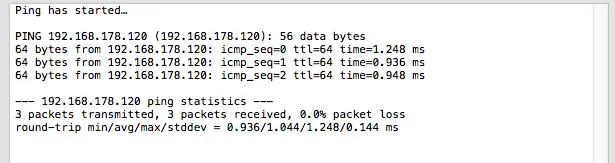
ping and port tests
 

Attachments

  • Screen_Shot 2.webp
    Screen_Shot 2.webp
    15.2 KB · Views: 79
  • Screen_Shot.webp
    Screen_Shot.webp
    13 KB · Views: 70
  • Screen_Shot 1.webp
    Screen_Shot 1.webp
    21.4 KB · Views: 77
Hmm, they appear to be nginx.logs. Shouldn't there be logs from npm itself as well?

server { set $forward_scheme http; set $server "192.168.178.120"; set $port 8096; listen 80; #listen [::]:80; listen 443 ssl http2;
As far as I am concered the directive set is used to assign values to variables. The "listen" directive is actualy what binds the ports. I assume the "consuming" directive are somewhere in the files injected by the "include" directives.

It kind of feels like we have two different topics mixed, one of them beeing a problem to access the nginx proxy manager ui and probably something else (that belongs to the shared conf, the portscan and the ping result)?
 
Hmm, they appear to be nginx.logs. Shouldn't there be logs from npm itself as well?


As far as I am concered the directive set is used to assign values to variables. The "listen" directive is actualy what binds the ports. I assume the "consuming" directive are somewhere in the files injected by the "include" directives.

It kind of feels like we have two different topics mixed, one of them beeing a problem to access the nginx proxy manager ui and probably something else (that belongs to the shared conf, the portscan and the ping result)?
I can access the NPM UI without any problems. The problem is that RP isn't working when I setup a proxy host
 

Attachments

  • Screen_Shot 3.webp
    Screen_Shot 3.webp
    16.8 KB · Views: 110
  • Screen_Shot 5.webp
    Screen_Shot 5.webp
    12.1 KB · Views: 111
Ah okay, then I was on the wrong trail. This snipped made me believe there is a problem with npm in general:
2021/05/16 13:21:51 [error] 264#264: *7 connect() failed (111: Connection refused) while connecting to upstream, client: 127.0.0.1, server: nginxproxymanager, request: "GET /api/ HTTP/1.1", upstream: "http://127.0.0.1:3000/", host: "127.0.0.1:81"

So it's realy just a rp problem.

The next steps I would pursue are:
- open a terminal inside the npm container and use curl/wget (if any of those actualy exist inside the container) to query the target service with it to check wheter there is generall communication problem between the containers.
- take a look (and share) at the config-snippets included in the rp config - the real magic must take place there.
 
Ah okay, then I was on the wrong trail. This snipped made me believe there is a problem with npm in general:


So it's realy just a rp problem.

The next steps I would pursue are:
- open a terminal inside the npm container and use curl/wget (if any of those actualy exist inside the container) to query the target service with it to check wheter there is generall communication problem between the containers.
- take a look (and share) at the config-snippets included in the rp config - the real magic must take place there.
This is what I get when using curl piwigo.mydomain.com in the docker terminal
Code:
<html>                                                                                                                 
<head>                                                                                                                 
<meta http-equiv='Content-Type' content='text/html; charset=utf-8'>                                                   
<title>401 Unauthorized</title></head>                                                                                 
<body onload="document.aForm.submit()"><h1>401 Unauthorized</h1>                                                       
<p>Access to this resource is denied, your client has not supplied the correct authentication.</p><form method="post" a
ction="unauth.cgi?id=8f002ff746e8e08cd9fdb8207fad18b5afd548cc3f76a6876f83d49ec386c62a" name="aForm"></form></body>
 
As the Nginx log reported before, "connection refused" this Unauthorized is the same error just from the front end app standpoint.

Try and get some other app running on the same reverse hostname just don't point to the piwigo app (some other), and see if that reverse host will work. Try and redirect to DSM login page or something like that.

So we can eliminate the NPM s a problem here.
 
As the Nginx log reported before, "connection refused" this Unauthorized is the same error just from the front end app standpoint.

Try and get some other app running on the same reverse hostname just don't point to the piwigo app (some other), and see if that reverse host will work. Try and redirect to DSM login page or something like that.

So we can eliminate the NPM s a problem here.
None of my docker container app will work, I've tried all off them even a DSM redirect.
All of them are working fine with the Builtin Reverse Proxy of Synology.

I guess I better stick to the default RP of Synology, this is a lot off headache to get it to work.
 

Create an account or login to comment

You must be a member in order to leave a comment

Create account

Create an account on our community. It's easy!

Log in

Already have an account? Log in here.

Similar threads

  • Article Article
Taipei, Taiwan – June 4, 2026 – Synology is unveiling its latest innovations at COMPUTEX 2026, featuring a...
Replies
0
Views
106
  • Article Article
Taipei, Taiwan – June 3, 2026 – Synology today announced ActiveProtect Manager 2.0, the latest update to...
Replies
0
Views
58
  • Article Article
Taipei, Taiwan — April 20, 2026 — Synology today announced the release of ActiveProtect Manager (APM) 1.2...
Replies
0
Views
100
  • Article Article
With an increase of AI-powered cyberattacks, Synology understands the importance of providing businesses...
Replies
0
Views
179
  • Article Article
With cyberattacks on the rise, companies must implement a cyber-resilient data protection solution capable...
Replies
0
Views
191
  • Article Article
Taipei, Taiwan — October 20, 2025 — Synology today announced the release of the ActiveProtect Manager...
Replies
0
Views
344

Thread Tags

Welcome to SynoForum.com!

SynoForum.com is an unofficial Synology forum for NAS owners and enthusiasts.

Registration is free, easy and fast!

Trending content in this forum

Back
Top