Hello users, I'm new to this site. I have a DS418 Synology NAS I'm attempting to bring online. (A Tech novice here, even at my age, old man, as my son calls me).
I am experiencing issues when attempting to connect it from my own PC; however, as I have also connected it to my wife's machine, she manages to get into it with some clicking. My wife thinks it's great as she is currently working to process her pictures from our last holiday. Unfortunately, I'm having difficulty accessing my part of the Drive even as the administrator. I did have my future son-in-law have a tinker with it, and he seemed to get it to run ok for a while.
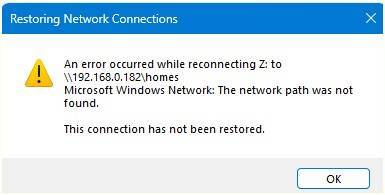
I am attempting to access it via Windows File Manager, but I can not get in. I click on the Z drive (as I have ID it), but get an error message.
I suspect I might have mucked up the original setup process at some point, and this might be causing the issues I am having. But I have no idea what I have done wrong or if there are settings that need changing. I am currently running Windows 11 Pro & have no Idea what I am doing. I hope it might be a simple fix with a bit of advice.
By chance, is there anything someone can suggest??
Many thanks for listening
I am experiencing issues when attempting to connect it from my own PC; however, as I have also connected it to my wife's machine, she manages to get into it with some clicking. My wife thinks it's great as she is currently working to process her pictures from our last holiday. Unfortunately, I'm having difficulty accessing my part of the Drive even as the administrator. I did have my future son-in-law have a tinker with it, and he seemed to get it to run ok for a while.
I am attempting to access it via Windows File Manager, but I can not get in. I click on the Z drive (as I have ID it), but get an error message.
I suspect I might have mucked up the original setup process at some point, and this might be causing the issues I am having. But I have no idea what I have done wrong or if there are settings that need changing. I am currently running Windows 11 Pro & have no Idea what I am doing. I hope it might be a simple fix with a bit of advice.
By chance, is there anything someone can suggest??
Many thanks for listening