Install the app
How to install the app on iOS

Follow along with the video below to see how to install our site as a web app on your home screen.

Note: This feature may not be available in some browsers.

Drive client Q.

8
1
NAS
DS224+
Operating system
  1. Windows
Mobile operating system
  1. iOS
Hi,

I created a folder (SharedFiles) on my win11 PC and it syncs fine with my NAS unit trough Drive Client. Every time I update a file within the mentioned folder, it updates accordingly.
Therefore, the Drive Client is acting as designed.

However, when I get into the SharedFiles folder with the browser, it takes loooong time to list files.

I tried using the the NAS' ip and/or the Synology's remote account name in configuration (in Drive Client) with no avail.

What did I do wrong?

TIA
 
However, when I get into the SharedFiles folder with the browser, it takes loooong time to list files.
Accessing via browser, how exactly?

  • What browser?
  • Local LAN or over the Internet?
  • If it's over the Internet, what method?
  • Are you using the Drive web app or Files Station in that case?
 
Accessing via browser, how exactly?

  • What browser?
  • Local LAN or over the Internet?
  • If it's over the Internet, what method?
  • Are you using the Drive web app or Files Station in that case?
Sorry for not being clear.
I meant getting to my files stored on my PC (synced with Dive Client) with the file browser.
 
Sorry for not being clear.
I meant getting to my files stored on my PC (synced with Dive Client) with the file browser.
This only further opens up more questions. What about all the other questions?
 
What browser?
Win11 file browser, no web browser nor internet use. Just connection trough my home network.
I've no issues getting to the NAS viewing shared folders trough the file browser or connecting to the NAS using a web browser with a local ip: 192.168.1.250:5001

Are you using the Drive web app or Files Station in that case?
I'm using just Drive Client running as a service. As I mentioned in my first post, I've a "shared folder" on my PC which syncs with the NAS but, getting to it with my PC is slow. No other problems with my PC of other folders on it..

Thank you!
 
"shared folder" on my PC which syncs with the NAS but, getting to it with my PC is slow
Geeting to it how? If you said that:

I've no issues getting to the NAS viewing shared folders trough the file browser
So, what exact method is the issue here?

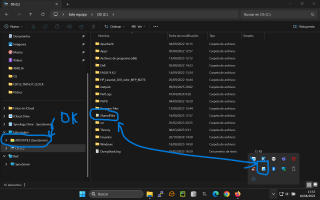
Can we get a screenshot maybe?
 
I see I've a communication issue here :))
As they say, a pic is worth 1.000 words...
So, here it is..
The SharedFiles folder in the picture is the one which causes a large delay in opening when I want to view a doc/file stored in it.
 

Attachments

  • img.png
    img.png
    211.8 KB · Views: 37
Ok now we are getting somewhere.

So if you have that location configured with the Drive client using the NAS local IP address, the first suspect would be the actual content structure and number of files inside it.

So browsing that same Drive content on the NAS side (the one being synced) is working fine?
 
Ok now we are getting somewhere.

So if you have that location configured with the Drive client using the NAS local IP address, the first suspect would be the actual content structure and number of files inside it.

So browsing that same Drive content on the NAS side (the one being synced) is working fine?
If you mean by "working fine" I can get to and view the files with no delay, then yes!!

Using a web browser (Firefox)... nas_ip:5001 -> synology drive -> team folder -> any folder -> any file. right click -> preview (y)

However, as I said earlier: using win11's file browser -> c: drive -> SharedFiles folder -> lot of delay!! (n)
 
Well that sounds like a local WIN OS issue of some sort imho... not sure what to say.

How many items are in there? What happens if you list that folder location via Command line (CMD)? Does it list fast?
 
Well that sounds like a local WIN OS issue of some sort imho... not sure what to say.

How many items are in there? What happens if you list that folder location via Command line (CMD)? Does it list fast?
:unsure:Interesting approach!! Using the CMD command and "type doc.txt" to view a file within the SharedFiles folder, is fast!!So, it narrows done to the file browser? not really as I have no issues with other folders which are not synced the the NAS.
 
How many items are in the folder?
Removed the Drive Client from my PC and re-installed it, erased all the (shared) files on the NAS and unlinked the client. Created a new sync connection and all seems to be good.
Thanks much for helping!!
 

Create an account or login to comment

You must be a member in order to leave a comment

Create account

Create an account on our community. It's easy!

Log in

Already have an account? Log in here.

Similar threads

I'm running a DS220+ as a NAS and have only one drive mapped to it. After a few hours attached, I...
Replies
0
Views
35

Welcome to SynoForum.com!

SynoForum.com is an unofficial Synology forum for NAS owners and enthusiasts.

Registration is free, easy and fast!

Back
Top