Install the app
How to install the app on iOS

Follow along with the video below to see how to install our site as a web app on your home screen.

Note: This feature may not be available in some browsers.

How to Save a ABB to a Removable Drive?

19
3
NAS
DS1512+
Operating system
  1. Windows
Mobile operating system
  1. Android
Sorry for this simple and basic question. I have had my Synology running ABB for some time now and my drives are of course now full. I would like to keep the oldest backup of my Windows computers and delete newer ones and clear up some space to start over. I really need to take time to set up a real backup solution, but this is where I am now.

I have portable drive enclosures or thumb drives are easy enough to get. Whatever is the best solution. Basically I'm old enough to know that there is a problem, but not as computer literate as I once was. Just not enough time for everything.

Any suggestions how to save my old 1st versions of backups then delete and start over?
 
I would like to keep the oldest backup of my Windows computers and delete newer ones and clear up some space to start over
I am curious as to why the "oldest" backup and not the most recent? Regardless, the only way I see this happening is to "lock" the current oldest backup in the archive (depending on how the versioning is set), and then delete others.

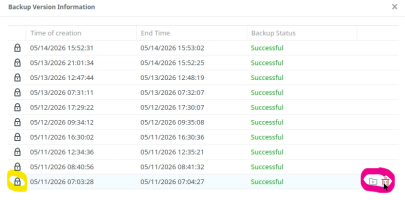
For example
1778825560932.png

Opening "Task list > Versions" option inside ABB interface you will get a similar window. Here you can use the lock icon to "save" the backup version you want, and click the trash icon on the right hand side for any particular version you want to delete.

Not sure where the portable drive comes into play, but you can't host an ABB archive on an external device and still have ABB perform backups. The reason is that ABB archive needs to be on a BTRFS formated volume and that volume can't be hosted on a USB device.

What you can do is move/copy that archive to the USB drive using HyperBackup or USB Copy DSM app, for archiving purposes, but not for active backups. So, if the intention here is to shrink the archive and "back it up" and move it off the NAS in order to start fresh, then that would work.
 

Attachments

  • 1778825536228.png
    1778825536228.png
    141.8 KB · Views: 16
Thank you, Rusty. Very helpful. My reason for saving the old backup is that I have had several issues with Windows over the years. Often causing reinstall of my OS and data. It seems that things are never the same after a start over as they were before. I am always concerned that I have missed something that I need in the future. So it seems best to me to save an old backup just in case. I may be doing it wrong but it makes sense to me.

I have followed your direction and have found the versions. I have nearly 300 versions for each of my 2 computers that are used daily. And a 100 or more for an older computer that is no longer in service. Is it safe to just start deleting versions in whatever order I chose? Or are these versions somehow dependent on each other as in an incremental backup?

I obviously will never need to do a full restore, but may sometime need to restore something from these backups. Most likely a photo or some document that I have lost.
 
Is it safe to just start deleting versions in whatever order I chose? Or are these versions somehow dependent on each other as in an incremental backup?
By default, with ABB, the initial backup is full, all subsequent ones are incremental. With macOS, ABB will trigger a full backup every 20ish incremental backups to free storage after backup versions are rotated. This is not the case with Windows machines.

So, my suggestion in this case would be to initiate a full backup for sure, and then you can "safely" delete backups that have happened before that full one.
 

Create an account or login to comment

You must be a member in order to leave a comment

Create account

Create an account on our community. It's easy!

Log in

Already have an account? Log in here.

Popular tags from this forum

Similar threads

Replies
4
Views
266
Was just about to write this as well! "Classic" issue for most. Glad it was that simple.
Replies
3
Views
273
Ticket is already been in play on this for 11 days! Support is just now getting around to providing a...
Replies
9
Views
1,735
File Servers | Active Backup for Business - Synology Knowledge Center there is nothing about deduplication...
Replies
2
Views
418
Now I am actually getting the same error even on Windows
Replies
2
Views
566
Update: Tried to backup specific folders with Synology Drive but same problem. Synology Drive Client...
Replies
1
Views
315
After going down the very long road to a very small house with Synology, we decided to surrender. We took...
Replies
12
Views
863

Thread Tags

Welcome to SynoForum.com!

SynoForum.com is an unofficial Synology forum for NAS owners and enthusiasts.

Registration is free, easy and fast!

Trending content in this forum

Back
Top