- 26
- 12
- NAS
- ds423+
- Operating system
- Linux
- Mobile operating system
- Android
I have followed this forum for some time, but untill now I have not had a problem worth mentioning, however...
The saga started when I decided to migrate the drives from my 918+ to a 423+. All went well untill it tried to download dsm. It said that there was no space on the root file system. I put the discs back into the 918+ and it booted up and so I was able to get ssh access.
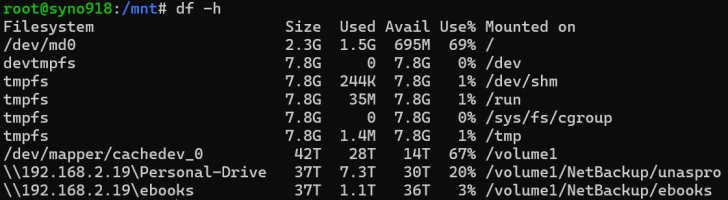
Checking usage gave the following:-
ianp@syno918:/dev$ df -h
Filesystem Size Used Avail Use% Mounted on
/dev/md0 2.3G 2.3G 0 100% /
devtmpfs 7.8G 0 7.8G 0% /dev
tmpfs 7.8G 244K 7.8G 1% /dev/shm
tmpfs 7.8G 19M 7.8G 1% /run
tmpfs 7.8G 0 7.8G 0% /sys/fs/cgroup
tmpfs 7.8G 1.4M 7.8G 1% /tmp
/dev/mapper/cachedev_0 42T 28T 14T 67% /volume1
As you can see the /dev/md0 partition is indeed full.
This is the limit of my knowledge so can anyone please give me any advice on how to clear some space without messing up the system. Many thanks.
The saga started when I decided to migrate the drives from my 918+ to a 423+. All went well untill it tried to download dsm. It said that there was no space on the root file system. I put the discs back into the 918+ and it booted up and so I was able to get ssh access.
Checking usage gave the following:-
ianp@syno918:/dev$ df -h
Filesystem Size Used Avail Use% Mounted on
/dev/md0 2.3G 2.3G 0 100% /
devtmpfs 7.8G 0 7.8G 0% /dev
tmpfs 7.8G 244K 7.8G 1% /dev/shm
tmpfs 7.8G 19M 7.8G 1% /run
tmpfs 7.8G 0 7.8G 0% /sys/fs/cgroup
tmpfs 7.8G 1.4M 7.8G 1% /tmp
/dev/mapper/cachedev_0 42T 28T 14T 67% /volume1
As you can see the /dev/md0 partition is indeed full.
This is the limit of my knowledge so can anyone please give me any advice on how to clear some space without messing up the system. Many thanks.
This post includes affiliate links. As an Amazon Associate, SynoForum.com may earn a commission if you make a purchase — at no extra cost to you.
It helps support our community! Learn more...