Install the app
How to install the app on iOS

Follow along with the video below to see how to install our site as a web app on your home screen.

Note: This feature may not be available in some browsers.

DS225+ connection to UPS

5
1
NAS
DS225+
Operating system
  1. Windows
Mobile operating system
  1. Android
This should be a trivial thing to set up, but I am a little confused. I've been using the DS225+ as a replacement for Windows Server Essentials, which was a replacement for Windows Home Server. Overall I've been impressed with the features of the NAS, just getting started with Photos.

After a couple of unexpected power outages, I'd like to set up a UPS with communication with the NAS to ensure a graceful shutdown. The Synology website identified the CyberPower SX650U as a compatible UPS. However, the UPS has 'A' type (flat) USB connections, and is supplied with a USB 'A' to 'B' (square) cable. The NAS has two USB ports, both type 'A'.

Do I in fact need a USB male 'A' to USB 'A' to make this connection? I've found the configuration screen in the NAS control panel, so I understand how that should work.

Thanks in advance for the assistance.

- KTM-Don

This post includes affiliate links. As an Amazon Associate, SynoForum.com may earn a commission if you make a purchase — at no extra cost to you.
It helps support our community! Learn more...

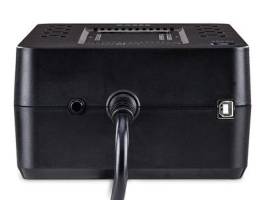
 
Looking at photos on their site, the USB B connection from UPS to the NAS is beside the UPS power input cord.
 
Upvote 0
Looking at photos on their site, the USB B connection from UPS to the NAS is beside the UPS power input cord.
Thanks for checking that out, but the rear connector is actually USB A type. I have found an APC UPS that is not on the approved list that uses a modular connector with an USB A male plug on the other end.
 
Upvote 0
The two USB 'A' ports are for charging, not for signaling the NAS. There is a USB 'B' port for signaling on the side, near where the power cord enters. The 'B' to 'A' cable can connect that port to your NAS.

MX00114326-3.jpg
 
Upvote 0
The two USB 'A' ports are for charging, not for signaling the NAS. There is a USB 'B' port for signaling on the side, near where the power cord enters. The 'B' to 'A' cable can connect that port to your NAS.

View attachment 33693
Perfect, thanks for pointing that out! I may be overthinking this business, as I think any UPS with communication features probably would work with the appropriate cable. Last time I did this it was using serial ports.

I'm impressed with the quick responses on this forum, I might have to upgrade my account!
 
Upvote 0
FYI, USB hubs are not officially supported by Synology. But some here have reported success with them. Yes, this forum can be an incredible resource for knowledge and wisdom. Welcome.
 
Upvote 0
Thanks, I think I ran across that note. I've had bad luck in general getting things to function through a hub, so no surprise there.
 
Upvote 0
UPS arrived today, and is now powering the NAS and getting a full charge. I ended up using an APC CS 350. I'm only trying to protect the NAS and safely shut down the system during power loss, so the low backup capacity is fine. It fits nicely on a tiny shelf with the DS225+ NAS. The Synology software recognized the UPS, and let me configure the system. The CS 350 came with a modular plug (UPS) to USB A (NAS) cable.
 
Upvote 0

Create an account or login to comment

You must be a member in order to leave a comment

Create account

Create an account on our community. It's easy!

Log in

Already have an account? Log in here.

Popular tags from this forum

Similar threads

Hello Senior, I’m considering using a WD WDBWLG0080HBK‑NESN (WD Elements 8TB external desktop HDD, USB...
Replies
0
Views
297
Thanks! I've just done the same migration - no problem. You gave me the courage to do it! BTW I added one...
Replies
11
Views
2,563
  • Question Question
Well, I think you're onto something. I rebooted my Mac then reset the switch counter before using Finder...
Replies
8
Views
871
  • Solved
Hello scgf, Thank you for the information. Besides communicating with the UPS to trigger a shutdown, it's...
Replies
9
Views
2,377

Thread Tags

Welcome to SynoForum.com!

SynoForum.com is an unofficial Synology forum for NAS owners and enthusiasts.

Registration is free, easy and fast!

Trending content in this forum

Back
Top