Install the app
How to install the app on iOS

Follow along with the video below to see how to install our site as a web app on your home screen.

Note: This feature may not be available in some browsers.

Has macOS Sequoia 15.X broken ABB

22
7
NAS
DS1618
Operating system
  1. macOS
Mobile operating system
  1. iOS
Last edited:
UPDATE: Have seen the failure on a third Mac. This posting from the SuperDuper folks points to a macOS bug: Shirt Pocket Watch - You’re a Mean One

Please consider this preliminary - I am still troubleshooting. ABB backup jobs for two Macs here have started failing coincident with those systems upgrading to macOS Sequoia 15.2 (from 15.1). DSS, ABB Package and ABB Agent fully up-to-date. Jobs now taking a very long time, GB transferred increases but percentage done ceases to update around 70 or 80 percent done and some time later backup fails with error -3 (Failed to run asr).

This might be local to my circumstances but wanted to post this heads up in case anyone is observing failures (or continued success) post 15.2
 
Last edited:
Hello everyone,

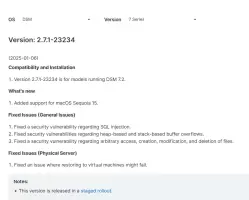
There is a new Synology Active Backup for Business Package, that you'll have to manually install.
With the latest MacOS 15.3 Beta version AND this updated Synology package ALL IS Good again! Tested in 4 systems, all of them successfully completed backups!
Seems it's resolved!
 

Attachments

  • Screenshot 2025-01-20 070350.webp
    Screenshot 2025-01-20 070350.webp
    46.8 KB · Views: 107
Upvote 0
Can confirm, ABB is working on my Mac with the latest macOS beta installed. My configuration is as follows:
  • macOS Sequoia, Version 15.3 Beta (24D5055b)
  • Synology Active Backup for Business, Version 2.7.1-23234

 
Upvote 0
By the looks of it the 15.3 beta 2 with ABB 2.7.1 (restored just the other day from beta 3 back to beta 2 for testing), does not work. Again in the 5x increment + 5x full backup drill.

Will update to beta 3 and rerun again later on, but atm the situation is the same.

Screenshot 2025-01-20 at 20.29.22.webp

So far, 2 attempts, 3rd ongoing.
 
Upvote 0
Last edited:
I updated everything to try and get it back working; (This machine is primarily used for browsing and learning so i'm quite happy to do this but would never do it with my primary work machine)
So MacOS 15.3 Beta 3 Apple M3 Pro (in case that makes a difference the intel ones might behave differently
ABB is 3.0.0 - 24557

Edit
Oh my source type is entire device if that matters (More detail can't hurt right)
 
Upvote 0
By the looks of it the 15.3 beta 2 with ABB 2.7.1 (restored just the other day from beta 3 back to beta 2 for testing), does not work. Again in the 5x increment + 5x full backup drill.

Will update to beta 3 and rerun again later on, but atm the situation is the same.

View attachment 21822
So far, 2 attempts, 3rd ongoing.
Beta 2 does not work. Beta 3 works correctly.
 
Upvote 0
Yep indeed, didn't even had to delete the failed one. Finished with a single incremental patch in under 10min.
 
Upvote 0
So everyone seems happy with 15.3 beta 3? The RC developer build was just released. I haven't done much testing, but when I have attempted to access my NAS after installing beta 3 I haven't had any issues.
 
Upvote 0
So everyone seems happy with 15.3 beta 3? The RC developer build was just released. I haven't done much testing, but when I have attempted to access my NAS after installing beta 3 I haven't had any issues.
Tried with RC installed. Everything works ok!
 
Upvote 0
Updated to macOS 15.3 on my m4 mac mini pro - no update to ABB (still on v2.7.0-23221) and hey presto, ABB is now completing backups again. Time machine, however ... :rolleyes:
 
Upvote 0
That’s all good to hear. Looking forward to doing the 15.3 update once I get the chance later in the week.
 
Upvote 0
Last edited:
Can confirm macOS 15.3 / ABB 2.7.1-23234 (package manually installed after 6th of Jan release during troubleshooting) / macOS ABB Agent 2.7.1-3234 all work OK now. Manual backup completed no problem, subsequent scheduled backup as well.

Phew.
 
Upvote 0
Just moving forward with this topic (renamed it to eliminate the version number).

ABB works fine on 15.4 developer beta
 
Upvote 0
ABB is working on 15.4 but I had the common "defective file" issue, which was not solvable using Synology's recommended procedures (i.e., using find and -inum in recovery mode). I'm posting a solution here in case others encounter the same problem.
Synology provided a python script for doing a 'cat [file]' test in a loop through all files and then reporting the pathname for those with illegal byte sequences. This too was failing because 'cat [file]' got hung up on certain files for reasons other than illegal byte sequences. I modified the script to echo the pathname BEFORE each cat attempt, which showed which ones were hanging. Next I modified the script to exclude those files from the testing loop. This allowed the cat tests on all remaining files to complete, which identified two spotlight-related files with illegal byte sequences. I deleted these, and now ABB is working just fine. Based on earlier posts, I won't be surprised if spotlight produces corrupt files again.
 
Upvote 0

Create an account or login to comment

You must be a member in order to leave a comment

Create account

Create an account on our community. It's easy!

Log in

Already have an account? Log in here.

Popular tags from this forum

Similar threads

Rusty: I very much appreciate your content here on the forum. Thanks for your efforts.
Replies
1
Views
130
Now I am actually getting the same error even on Windows
Replies
2
Views
538
Tahoe 26.5 beta (25F5042g)- ABB backup works with no issues. Just tested restore with several random...
Replies
20
Views
3,162

Welcome to SynoForum.com!

SynoForum.com is an unofficial Synology forum for NAS owners and enthusiasts.

Registration is free, easy and fast!

Trending content in this forum

Back
Top