Install the app
How to install the app on iOS

Follow along with the video below to see how to install our site as a web app on your home screen.

Note: This feature may not be available in some browsers.

synology photos app duplicating photos

Cyberwasp

Subscriber
470
76
NAS
Synology DS920+
Operating system
  1. Windows
Mobile operating system
  1. Android
After the last update to the photos app, it has been duplicating my newly added pics. I looked at the info on each duplicate, and it matches the original. If I remove the duplicates it's fine. However. it's very annoying. Anyone know of a fix?? TIA
 
Do you mean the update to the mobile app? Or the DSM package?

Seems odd that it double uploads the same new image files. Wondering if you could also be having duplicates uploaded: both Drive mobile and DS file apps can be configured to upload mobile camera rolls.
 
Upvote 0
it starts in the mobile app with the dupes, then uploads them to Synology Photos DSM. The phones galley only has one photo. I'll disable Drive and DS File to see.

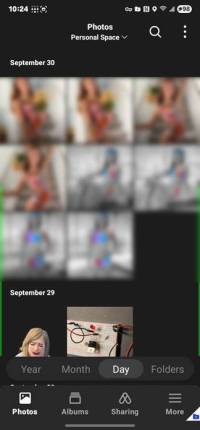
it's weird as I open the photo app to make sure it's connected, it first shows just one pic, then roughly 10 seconds the dupes load. Like it's doing the op again. Had to blur photos due to copyright but this is what I get. 2 of eacch with the cloud symbol from Synology
 

Attachments

  • photos-app.jpg
    photos-app.jpg
    21.9 KB · Views: 47
Upvote 0
I'll disable Drive and DS File to see.
Just the photo backup feature within these apps, obviously. You can still use them for their primary functions.

The duplicated photos: do they have the same filename? the same full folder/file path? Same file formats?

While you investigate, another thought: I have a Nikon camera and I set it to a slow burst mode, which can continue to take photos while I hold down the shutter (it invariably takes two shots with a short press). Does the mobile camera have a similar mode, and could you have switched it on recently?
 
Upvote 0
Yes they have the exact same name and path. not using camera, just image capture on samsung phone.
 
Upvote 0
That's really weird then. That would imply there's a database/display issue rather than duplicated image files. Does this happen on the Synology Photos web portal too, or is it just on the mobile app? I don't see this with the iOS mobile app, nor my Photos web portal.

Maybe play with the mobile app's settings, or reinstall it?
 
Upvote 0
it only happens on the web portal if the app makes duplicates. Today it didn't happen so I'm not going to mess with anything unless it does it again.
 
Upvote 0
Don’t open the portal or app while whistling or appearing to be in a happy mood!
 
Upvote 0
Alternatively, you can try temporarily turning off iCloud Photos, then restarting your device and turning it back on. This often stops new duplicates from appearing. If this continues to happen, wait for the next patch from Apple.
 
Upvote 0

Create an account or login to comment

You must be a member in order to leave a comment

Create account

Create an account on our community. It's easy!

Log in

Already have an account? Log in here.

Similar threads

  • Question Question
Hello, you can only export all existing messages; otherwise, Synology DSM is the wrong platform. Synology...
Replies
1
Views
98
Potentially you could try using the reverse proxy feature. The source would be set to be HTTP on a NAS...
Replies
1
Views
345
Most Synology desktop apps have versions for all three major OS platforms Synology Drive for Linux had...
Replies
1
Views
265
I opened up a ticket with Synology, and they sent a quick response: I logged in to the NAS and set about...
Replies
5
Views
1,168
Thanks for the reply @Cen Karter. I have since changed the set-up to one file in root + photos, with...
Replies
2
Views
583

Welcome to SynoForum.com!

SynoForum.com is an unofficial Synology forum for NAS owners and enthusiasts.

Registration is free, easy and fast!

Trending content in this forum

Back
Top