Install the app
How to install the app on iOS

Follow along with the video below to see how to install our site as a web app on your home screen.

Note: This feature may not be available in some browsers.

Question DS412+ not booting: serial console shows EFI Internal Shell missing boot devices, but EFI partition on internal storage seems intact

Last edited:
TLDR: Found USB Stick with USBest Chip. Cross tested the usbest chip -> not broken, has to be the flash itself. So no way to extract the data.
Got a tool to change PID/VID to F400 of usb stick.
NAS boots from front USB slot with the usb stick.
The only thing left is to change MAC/SN in Firmware on the stick. ->Found a post on how to calculte the checksum of mac adress. But still no idea what file and what location in the file i shoud edit with a hex editor.

--- Old post
I got a USB stick that had the same USBest chip as the DOM. I soldered it to the DOM, but unfortunately I still can't access the flash chip. The USB device is recognized and displayed, but the memory is missing.
Now I will transfer the original DOM chip to the USB stick and see if it works there. Then I will have cross-tested and can say for sure that it is the memory. EDIT: The NAS DOM Chip is working on the usb drive. So this time it is not the USBest that caused my problem.

Then I can also use the USB stick to test whether I can boot the NAS with it. Even if I still have to adjust the MAC and SN, I can at least see if it starts.
But i tried for some time to figure out how to change the VID of the usb stick. It seems i cant find a tool to help with this task on flashboot.ru Edit: I think i got it with a tool called: HWUpgv1010v3. If i check the stick with usbdeview it shows F400 for both. Flashed back the img with hddrawcopy. NAS seems to boot from the front USB slot, blue blinking led is gone.
 
Last edited:
TLDR: Found USB Stick with USBest Chip. Cross tested the usbest chip -> not broken, has to be the flash itself. So no way to extract the data.
Got a tool to change PID/VID to F400 of usb stick.
NAS boots from front USB slot with the usb stick.
The only thing left is to change MAC/SN in Firmware on the stick. ->Found a post on how to calculte the checksum of mac adress. But still no idea what file and what location in the file i shoud edit with a hex editor.

--- Old post
I got a USB stick that had the same USBest chip as the DOM. I soldered it to the DOM, but unfortunately I still can't access the flash chip. The USB device is recognized and displayed, but the memory is missing.
Now I will transfer the original DOM chip to the USB stick and see if it works there. Then I will have cross-tested and can say for sure that it is the memory. EDIT: The NAS DOM Chip is working on the usb drive. So this time it is not the USBest that caused my problem.

Then I can also use the USB stick to test whether I can boot the NAS with it. Even if I still have to adjust the MAC and SN, I can at least see if it starts.
But i tried for some time to figure out how to change the VID of the usb stick. It seems i cant find a tool to help with this task on flashboot.ru Edit: I think i got it with a tool called: HWUpgv1010v3. If i check the stick with usbdeview it shows F400 for both. Flashed back the img with hddrawcopy. NAS seems to boot from the front USB slot, blue blinking led is gone.

Good Job Bud!! You see. Saved a $150 service call. Well worth it. And yes. On rare occasions we will see here at the service center the ram go bad on these. It actually gets corrupted from the controller. The USBEST controller. Happens like 20% of the time. In this case only a new one will fix it. Something I should have mentioned. Oddly. As long as you have some USB drive attached with PID/VID changed to F400. You can even plug it in the back of the NAS. It will boot. There are a few who do this with different DSM's they play with. flashboot website has 95% all the tools you need. And yes, they do miss a couple. So many tools for one chip is the problem. LOL! And hard to pick the right one without testing first. HWUPGRD can work too. Now that yours boots from the USB slot. Later you can buy a replacement DOM if you want on eBay. I posted that earlier. Like $8. Change the PID/VID to F400. And plug it in the board. This is only if you don't like the USB stick sticking out the front. By the way. The USB stick doesn't have to have a USBEST controller. Can be anything. Just as long as you can find the tool to change the PID/VID to F400 on any USB stick. You are fine. But glad to have helped a bit. Enjoy!-Ray
 
Last edited:
OK und i figured out how to change MAC and SN.
Just open the created backup diskdump file of the DOM with a hex editor and search for the mac adress. they start with 001132 it seems. There are 2 MAC Adresses in direct succession followed by some 00 values then comes the serialnumber.

The MAc consists of 6 hex values + a checksum.
Same for the serial. After the SN there is also a checksum hex value. it is calculated in the same way.

Checksum is caluclated by converting the hex value to normal decimal numbers, add them together and convert the sum back to hex and use the last two digits of the hex value.

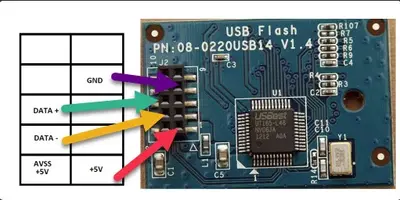
This post helped a lot on how to calulate the checksum: DS412+ USB flash module pinout

i have attached a picture of the values that must be changed. The FF hex values would be the checksumes.
 

Attachments

  • nas-file.webp
    nas-file.webp
    15.2 KB · Views: 137
OK und i figured out how to change MAC and SN.
Just open the created backup diskdump file of the DOM with a hex editor and search for the mac adress. they start with 001132 it seems. There are 2 MAC Adresses in direct succession followed by some 00 values then comes the serialnumber.

The MAc consists of 6 hex values + a checksum.
Same for the serial. After the SN there is also a checksum hex value. it is calculated in the same way.

Checksum is caluclated by converting the hex value to normal decimal numbers, add them together and convert the sum back to hex and use the last two digits of the hex value.

This post helped a lot on how to calulate the checksum: DS412+ USB flash module pinout
Yes. I do it with an excel spread sheet to save me the math. But yes. All MACs will have like a 2 digit checksum. Serials usually have 3. Some units have 4 macs too. And usually the MAC address is next to the serial in your hex editor. You also can do this live if your connected via serial port on the bottom of the NAS. That little rubber boot at the bottom of the NAS on most models. Logged in as root, and in insertion mode. I can do it remotely, and even change the DSM remotely. Or model. Now if your really handy in that area. You can backup the old DSM from the USB drive. Your safety net for what's next. --------------Go in an tinker and change the model number to a newer one that matches your CPU. You have the Atom D2700. Like a DS713+ for example. And get the newer DSM's. Head on over to:


And match your CPU to a newer model.
You now own a newer NAS. LOL!
And any errors. You still have your safety net backup DSM. LOL!
Have fun playing! Enjoy!
 
I had a pretty similar problem on my DS412+, blinking blue leds, no boot.
Serial log showed
Code:
map: Cannot find required map name.
too.
Plugging DOM into a linux machine revealed a GPT fault:
Screenshot 2024-07-05 104647.webp


I fixed it with
Code:
# parted /dev/sdc
GNU Parted 3.5
Using /dev/sdc
Welcome to GNU Parted! Type 'help' to view a list of commands.
(parted) p                                                               
Warning: Not all of the space available to /dev/sdc appears to be used, you can fix the GPT to use all of the space (an extra 10225730 blocks) or continue with the current setting?
Fix/Ignore? Fix
 
I had a pretty similar problem on my DS412+, blinking blue leds, no boot.
Serial log showed
Code:
map: Cannot find required map name.
too.
Plugging DOM into a linux machine revealed a GPT fault:
View attachment 15283

I fixed it with
Code:
# parted /dev/sdc
GNU Parted 3.5
Using /dev/sdc
Welcome to GNU Parted! Type 'help' to view a list of commands.
(parted) p                                                              
Warning: Not all of the space available to /dev/sdc appears to be used, you can fix the GPT to use all of the space (an extra 10225730 blocks) or continue with the current setting?
Fix/Ignore? Fix
Having it corrupted is too rare. A no boot 412+ is always a eDOM issue with the controller chip. But you can boot USB stick plugged in if the PID/VID is changed to F400. Try to get a Phison based or USBEST based controller when you buy your USB stick. As the tools for this are more available at flashboot.ru. Now about your corruption. Since the controller is dying. Expect it to happen again. A good rule of thumb to know a dying controller is if it takes more then 10secs to read the controller. Also head over to HDDguru's website and download his tool called HDDRAW Copy. Only tool we use here. As it is so simple to use. And does see the drive. Even if windows doesn't see it fully. Always good to have a copy of your edom in your stash of files. And if you buy a new edom on ebay for $5. You can change the pid/vid on it, and copy over your file in your stash to the new edom. Won't have to worry another 10 years
 
Last edited:
Yes, I totally agree.
I was lucky to mod a old SMI based USB stick with PID/VID F400, but had no luck with boot after dd'ing the img to it. Then I fixed the old DOM with mentioned procedure.
I'm very happy that my NAS is back online but neverthelss I ordered a new DOM.
Then I'll disassamle the whole thing again to create a clone and replace the old one. Don't wanna risk another long outage of my synology.

Only thing that I don't get (without having one in my hands): How will the 9pin connector fit to the mainboards 10 pin connector? Do I have to drill a whole in the new DOM's post connector strip (pin 9 is seald as far as I could see from the pics)?
DOM9pin.webp
 
How will the 9pin connector fit to the mainboards 10 pin connector? Do I have to drill a whole in the new DOM's post connector strip (pin 9 is seald as far as I could see from the pics)?
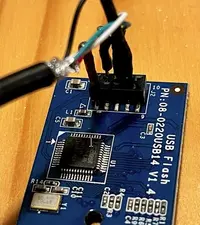
In the first post, I see that you only need to use 4 pins so, don't use a connector but loose wiring pins.

I have no other experience with this...
 

Attachments

  • 2024-07-06_11-48-06.webp
    2024-07-06_11-48-06.webp
    37 KB · Views: 200
  • 2024-07-06_11-54-57.webp
    2024-07-06_11-54-57.webp
    48.2 KB · Views: 192
Last edited:
Off course I noticed that. Also that the marked pin (nr.9) has no functionality.
But I don't want loose wiring inside my NAS. As soon as the replacement DOM has been flashed correctly, I want to install it back onto the mainboard of my DS412+, close the box and have it running for another 10 years.
 
I have a DS1512+ after a software update (Release Notes for DSM | Synology Inc. )
I have a blue LED flashing and the LAN LED is also flashing
I can still read the DOM/USB on a PC with Windows and Linux
I have 2 partition on the DOM and the data can be read
Does anyone have an idea to get my DS1512+ working again?
 
EDOM reading doesn't mean its not bad. When you copy te eDOM say using RAWCOPY tool. Does it take longer then 10 secs to read the full eDOM? If so. Its bad. As read timing with this is critical for the NAS to boot. Too slow, and the system never boots.
 
Creating an account just to show my appreciation to everyone in the thread and special thanks to @Elextrixman for sharing their knowledge on this issue. Without your efforts, I would have not been able to resolve a blinking blue light issue on my DS1512+. For those with this model, the daughter board has a mini USB port you can plug directly into so you don’t need to make an interface cable of your own. The biggest challenge for me was actually spoofing the VID PID onto the USB drive due to all of the chipsets and variations of flashing tools. I think I’m able to read Chinese and Russian now after this experience!! Again, thanks for bringing my NAS back to life!
 
Hello Sebastiaan,

I made the USB cable, can you please instruct me about the software (for Windows) to establish the connection and how to read and change the data.

Stan
Use Putty at 115200/8/1/none. Also make sure device manager shows the same. This usually doesn't fix this though. As I'm the Synology Service center for the Americas here. eDOMs, or eUSB's are only made to last 10 years. Its a basic USB thumb drive with 10 pins. Though only 4 are used. The other pins are just mounting pins for the socket. And the controller chip on the eDOM has died. Rule of thumb for eDOM's is. If it takes more then 10 sec to read one. Its bad. So you need a new eDOM. Or change the controller chip on your old one. Usually a PHISON or USBEST controller on the eDOM module. Here is what I do in my shop. First copy the old eDOM to PC using HDDrawcopy tool. Save that file. Goto ebay and search for "APACER 1GB 9-Pin USB Flash Drive Disk On Module DOM USB (Small 9PIN)". You have 10 pin. So just drill another hole in the module. Synology can only see VID/PID F400. And the new ebay eDOM has another PID/VID on it. So goto flashboot's website and download the tool that matches your new eDOM. And change the VID/PID to F400. Now Synology will see it as a boot drive. Now copy your old file from the PC to it. Plug it in and boot. You are done. The unit will now boot. It will take about 1 minute longer to boot then normal. Mainly as the old eDOM was 128meg in size. And the new one is 1G. So linux like to read even empty spaces. And this delays the boot. And you will then see 2 syno boot options show up. Synology has 2 boot features or OS's on these older NAS's. Ones a basic, just to get you into the command prompt. The other is the full boot on the eDOM. How it boots is Syno 1 EFI shell goes and looks for Syno2 eDOM.
If it finds it. Then the NAS boots. If not. Just goes to a shell command prompt. And Thats it. I actually get alot of requests here to send out a preprogrammed eDOM to just plug in. As I have to program it to work on your NAS. As it needs the serial info and MAC addresses put back into it. Buy the way. You can plug into the back of the NAS into a USB port a thumb drive even that has had its VID/PID changed to F400 or even F401, and the NAS will see it and boot. Many don't know this. But when a NAS boots. The bios tells it to start the boot sequence from memory and what to look for. It needs to see a USB drive, or eDOM that is on the board with PID/VID F400 or F401 to boot. F400 is the on board one. F401 is the external boot. But it really doesn't matter. If you had multiple USB drives. The menu would show more then 2 choices, and you can pick which one you want. I actually have customers with 2 USB drives plugged in the back. And some boot DSM 5 and some will change over to DSM 6 boot. Depending on the drive they choose in the menu of the serial port. I hope this helps.
 
YAY!!!! just used this thread to help me replace my controller chip on my DS1513+(god that's tough) i thought i had steady hands until you try and nudge this chip into place, took a while but got there in the end, one thing to point out is once allligned and stuck on heat each side up in turn while pushing down on the chip to make sure each leg is in place, mine had a few legs not touching until i did this, dont heat it all up just one side at a time and it wont move position.
for Ref I got my chip from here : https://www.ebay.co.uk/itm/146082299996
I msg him first and said i need the A0A version as another seller had already wasted his and my time sending the wrong one when they sent me the A1A version.

So now its all working i want to back up my current eDOM, is there a cmd you can do from ssh while the synology is running from it? or do i need to attach to a laptop and use windows? sry if already covered just point me in the right direction pls

Boysie
 
YAY!!!! just used this thread to help me replace my controller chip on my DS1513+(god that's tough) i thought i had steady hands until you try and nudge this chip into place, took a while but got there in the end, one thing to point out is once allligned and stuck on heat each side up in turn while pushing down on the chip to make sure each leg is in place, mine had a few legs not touching until i did this, dont heat it all up just one side at a time and it wont move position.
for Ref I got my chip from here : Pardon our interruption...
I msg him first and said i need the A0A version as another seller had already wasted his and my time sending the wrong one when they sent me the A1A version.

So now its all working i want to back up my current eDOM, is there a cmd you can do from ssh while the synology is running from it? or do i need to attach to a laptop and use windows? sry if already covered just point me in the right direction pls

Boysie
LOL! The hardest part is getting that chip off, and a new one on. So small and tiny legs. But good amount of flux will help keep the solder from bridging over the legs. So glad to have helped too. Another saved NAS. Now, here's something extra for you since you have actually a powerful 1513+. Yes. The 1512+, 1513+, 1812+, and 1813+ were actually the most power NAS's built up until 2018. Synology had tamed the specs on them as not to compete with other products. But the tame is a lie. I did a writeup on these models on my reddit posts as "The most powerful NAS Synology Made". Mainly why you have those 2 CPU's. And one is a dedicated IO cpu. Yours uses a D2700 cpu. And guess what? So do many more newer models. So if you like tinkering. Head over to Synology's CPU list for the D2700. And you can change your NAS to a newer model, that even supports DSM 7.2.2 Even if its a rack version firmware. Just keep a copy of your old eDOM as backup. And you will have a newer model NAS to enjoy. Here is the Synology CPU list. What kind of CPU does my Synology NAS have? - Synology Knowledge Center
 
YAY!!!! just used this thread to help me replace my controller chip on my DS1513+(god that's tough) i thought i had steady hands until you try and nudge this chip into place, took a while but got there in the end, one thing to point out is once allligned and stuck on heat each side up in turn while pushing down on the chip to make sure each leg is in place, mine had a few legs not touching until i did this, dont heat it all up just one side at a time and it wont move position.
for Ref I got my chip from here : 2PCS UT165-L48 LQFP48 USBEST #A6-14# | eBay
I msg him first and said i need the A0A version as another seller had already wasted his and my time sending the wrong one when they sent me the A1A version.

So now its all working i want to back up my current eDOM, is there a cmd you can do from ssh while the synology is running from it? or do i need to attach to a laptop and use windows? sry if already covered just point me in the right direction pls

Boysie

You can make yourself a disk image of the DOM by running:
- sudo dd if=/dev/synoboot of=/tmp/synoboot.img
 
LOL! The hardest part is getting that chip off, and a new one on. So small and tiny legs. But good amount of flux will help keep the solder from bridging over the legs. So glad to have helped too. Another saved NAS. Now, here's something extra for you since you have actually a powerful 1513+. Yes. The 1512+, 1513+, 1812+, and 1813+ were actually the most power NAS's built up until 2018. Synology had tamed the specs on them as not to compete with other products. But the tame is a lie. I did a writeup on these models on my reddit posts as "The most powerful NAS Synology Made". Mainly why you have those 2 CPU's. And one is a dedicated IO cpu. Yours uses a D2700 cpu. And guess what? So do many more newer models. So if you like tinkering. Head over to Synology's CPU list for the D2700. And you can change your NAS to a newer model, that even supports DSM 7.2.2 Even if its a rack version firmware. Just keep a copy of your old eDOM as backup. And you will have a newer model NAS to enjoy. Here is the Synology CPU list. What kind of CPU does my Synology NAS have? - Synology Knowledge Center
Is there a link you know off with the process needed to follow for this, i only see for me that the 2014 RS2414+ is newer using the same cpu. Also i cant see the supported list for 7.2.2 if you know of that as im assuming you are saying the 2014 models support it but the 2013 and lower dont as im only seeing up to 7.1
 

Create an account or login to comment

You must be a member in order to leave a comment

Create account

Create an account on our community. It's easy!

Log in

Already have an account? Log in here.

Similar threads

  • Question Question
From what I understand, Vitaliy used the file from Elextrixman and loaded the bios.ROM from the .PAT file...
Replies
1
Views
36
Hi, I suggest you to check the voltage at the coils (big square labelled R56, 4R7, ...). You should find...
Replies
45
Views
1,653

Thread Tags

Welcome to SynoForum.com!

SynoForum.com is an unofficial Synology forum for NAS owners and enthusiasts.

Registration is free, easy and fast!

Back
Top