Install the app
How to install the app on iOS

Follow along with the video below to see how to install our site as a web app on your home screen.

Note: This feature may not be available in some browsers.

Question DS412+ not booting: serial console shows EFI Internal Shell missing boot devices, but EFI partition on internal storage seems intact

Look up specs on the D2700. You will see 4G
I can't understand this Synology conspiracy theory.

But yes, as mentioned above, the 32-bit VirtualBox was limited to 4GB because it's generally assumed that more isn't possible. I patched VirtualBox 32-bit and I'm running an 64bit IBM appliance (with Windows 10 32-bit on my laptop) that really needs 10GB of RAM, otherwise it crashes.

That's just how it is.
 
dmidecode -t 17?
I don't have one here to tell you that. But let me ask you first. Was this command something you can do on the very limited OS Synology has? Do you have a copy of a 412 that ran this command? I hardly doubt it will accept this command. As I don't even see it on my acceptable command sheet.
 
Yes, of course it's DSM6/DSM7, why 5?

Synology itself only ships the Cedarview RackStation with a maximum of 3GB of RAM.
 
I can understand what you're saying. I don't know how technical the the people in the 30 pages are. And it is possible the cases you ran into had this issue and was drawing people with the same problem. As those who have it working won't be posting there. And I don't do all 412+'s with 4g. And each one is tested prior top leaving to make sure it is fully functional. I will admit. I had a couple who could not do this. With very high CPU usages. But the most successful ones were still on DSM 5. And yours may have been all on the latest. DSM6 for this model. Synology is very sneaky. When they catch on to public forum posts of what can be done. A memo is sent across developers to make changes to a patch or newer DSM to limit the abilities of the NAS. I can almost guarantee your group was all on DSM6. Synology is infamous for taming the best when they catch on. And with hardware too i updates. As you will see bios files in those PAT files.
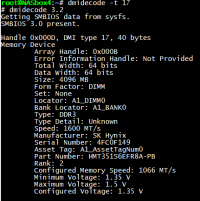
On a Synology NAS based on Intel 64-bit, it was always available to me. There you can see that the installed RAM is 1600MHz, but can only be operated at 1066MHz. I retrofitted it on my Synology ARM, but it doesn't make sense there, as certain values can't be read.
 
Yes, of course it's DSM6/DSM7, why 5?

Synology itself only ships the Cedarview RackStation with a maximum of 3GB of RAM.
Yep. So as not to compete with other models. I know the story more then you can imagine. Synology always limits only docs, and abilities so that product will not compete with other products. Its a old story with the, Why your unit, can take more, ram, use drives not listed, etc. Synology advertisement is designed to keep product aligned to a max capabilities in documentation that the user can do. The max in their world. Not user real world.
 
Yep. So as not to compete with other models. I know the story more then you can imagine. Synology always limits only docs, and abilities so that product will not compete with other products. Its a old story with the, Why your unit, can take more, ram, use drives not listed, etc. Synology advertisement is designed to keep product aligned to a max capabilities in documentation that the user can do. The max in their world. Not user real world.
On a Synology NAS based on Intel 64-bit, it was always available to me. There you can see that the installed RAM is 1600MHz, but can only be operated at 1066MHz. I retrofitted it on my Synology ARM, but it doesn't make sense there, as certain values can't be read.
Agreed. Why I mentioned the bit lock removal. In a previous post.
 
On a Synology NAS based on Intel 64-bit, it was always available to me. There you can see that the installed RAM is 1600MHz, but can only be operated at 1066MHz. I retrofitted it on my Synology ARM, but it doesn't make sense there, as certain values can't be read.
And where is that dmidecode -t 17 sheet you have that shows a report from a 412?
 
Yep. So as not to compete with other models. I know the story more then you can imagine. Synology always limits only docs, and abilities so that product will not compete with other products. Its a old story with the, Why your unit, can take more, ram, use drives not listed, etc. Synology advertisement is designed to keep product aligned to a max capabilities in documentation that the user can do. The max in their world. Not user real world.
Except that in this case there's a genuinely technical reason. The Synology Cedarview is faulty!
Just like all Apollolake processors. This is due to Intel, not Synology.
 
And where is that dmidecode -t 17 sheet you have that shows a report from a 412?
I've studied this hardware extensively and know exactly how everything works.

I wanted to prove that DSM7 runs on it, even though Synology doesn't like it. And it's no problem if you simply replace the model with the DS713+/RS814+ files on the second partition of the DOM using the four DSM files.

However, I've since returned all the devices.
 

Attachments

  • Unbenannt.PNG
    Unbenannt.PNG
    26.8 KB · Views: 23
...and if you want, you can tackle the same RAM speed issue on Intel Braswell. I ordered six devices, four of which are affected by the manufacturer's concerns. Since 1600MHz is clearly supported, only two actually achieve this speed. These are the Lenovo ThinkCentre M600 and the Synology DS716+II, both with N3160 Braswell. Examples of failed include Acer, Thecus, and Terra.
 
I've studied this hardware extensively and know exactly how everything works.

I wanted to prove that DSM7 runs on it, even though Synology doesn't like it. And it's no problem if you simply replace the model with the DS713+/RS814+ files on the second partition of the DOM using the four DSM files.

However, I've since returned all the devices.
Yes. This is done here too. Same as 1515+ to 1517+. And common. As long as you have the same cpu and platform. You can run the system that can support the latest DSM. I do it by changing some things on the eDOM. Public is done with SSH. Or PAT. But you lose Quickconnect. Unless. Like I do. You have a parts boards I can use the serial number for. As they are not assigned to nobodies accounts quick connect is.. I was told there was a work around for this. But I haven't tried it. Or even know how they do it. And can't even see how they can do it. As Synology DSM downloads go by Serial.
 
Yes. This is done here too. Same as 1515+ to 1517+. And common. As long as you have the same cpu and platform. You can run the system that can support the latest DSM. I do it by changing some things on the eDOM. Public is done with SSH. Or PAT. But you lose Quickconnect. Unless. Like I do. You have a parts boards I can use the serial number for. As they are not assigned to nobodies accounts quick connect is.. I was told there was a work around for this. But I haven't tried it. Or even know how they do it. And can't even see how they can do it. As Synology DSM downloads go by Serial.
So, my DS412+ ended up being a regular DS713+, and my RS812+ was an RS814+. For Quick Check (QC) on Synology systems, the serial number (SN), MAC address (MAC), and model number must match.

These days, this hack isn't even necessary anymore. DSM runs in Docker, in my case under ZFS on OpenMediaVault NAS OS. So, in that sense, I was years ahead of Synology :-)
 
So, my DS412+ ended up being a regular DS713+, and my RS812+ was an RS814+. For Quick Check (QC) on Synology systems, the serial number (SN), MAC address (MAC), and model number must match.

These days, this hack isn't even necessary anymore. DSM runs in Docker, in my case under ZFS on OpenMediaVault NAS OS. So, in that sense, I was years ahead of Synology :-)
So where are the Serial ands Macs coming from?
 
I got 412+ which makes next sequence: solid blue ~1sec - flashing blue ~7sec - off ~4 sec - flashing blue forever. Holding power button for 10 sec shuts it off.
BIOS has 3.3v supply. USB flash boars has 5v supply. USB flash board connected to PC shows everything looks fine but, maybe some files corrupted. Is it possible to restore it from 100% working image?
 
I got 412+ which makes next sequence: solid blue ~1sec - flashing blue ~7sec - off ~4 sec - flashing blue forever. Holding power button for 10 sec shuts it off.
BIOS has 3.3v supply. USB flash boars has 5v supply. USB flash board connected to PC shows everything looks fine but, maybe some files corrupted. Is it possible to restore it from 100% working image?
Have you taken the files from:
 
I'm not really pro in software. More in hardware. Could you please lead me to how to restore under Win10. What image I can use for it?
Could it be problem with BIOS crush? Is it possible to restore it without removing?
 
I'm not really pro in software. More in hardware. Could you please lead me to how to restore under Win10. What image I can use for it?
Could it be problem with BIOS crush? Is it possible to restore it without removing?
You simply need to copy the files to the flash drive using Linux. Do you have a second DiskStation/RackStation... any model will do?
 
You simply need to copy the files to the flash drive using Linux. Do you have a second DiskStation/RackStation... any model will do?
Or you can use the OSFmount tool, make your old image available, copy the files in, save it and flash the entire image again.
 

Create an account or login to comment

You must be a member in order to leave a comment

Create account

Create an account on our community. It's easy!

Log in

Already have an account? Log in here.

Similar threads

  • Question Question
From what I understand, Vitaliy used the file from Elextrixman and loaded the bios.ROM from the .PAT file...
Replies
1
Views
30
Hi, I suggest you to check the voltage at the coils (big square labelled R56, 4R7, ...). You should find...
Replies
45
Views
1,649

Thread Tags

Welcome to SynoForum.com!

SynoForum.com is an unofficial Synology forum for NAS owners and enthusiasts.

Registration is free, easy and fast!

Back
Top