Install the app
How to install the app on iOS

Follow along with the video below to see how to install our site as a web app on your home screen.

Note: This feature may not be available in some browsers.

Question DS412+ not booting: serial console shows EFI Internal Shell missing boot devices, but EFI partition on internal storage seems intact

Thanks. I will leave it for now as I cannot power it up anyway :(
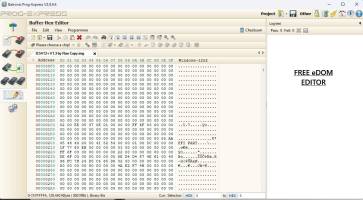
Yes. Since it doesn't boot. No need to fix eDOM. I attached what the service center uses for eDOM files and editing.
 

Attachments

  • EDIT.jpg
    EDIT.jpg
    141.1 KB · Views: 28
  • SETUP.jpg
    SETUP.jpg
    86.3 KB · Views: 28
Last edited:
Well, the device isn't really worth the effort. It only runs with 1066MHz RAM!?
Btw RAM, don't put more than 2GB in it.
Actually we put 4G Max for this model. Its undocumented for public. And can support up to 1600 Speed. And there is a selection bit to change the CPU controller to not under clock the 1600 to 1066. Any more ram then 4G is a issue for channeling lanes of the CPU, and causes veery high CPU usage, and a very slow NAS. Undocumented are many of these. Like the 15series. Those can go up to 16GB, and can use Ultra Speed ram way above 1600. But you won't find this info online. for the 15 series. That's more of a in house thing.
 
Actually we put 4G Max for this model. Its undocumented for public. And can support up to 1600 Speed. Any more ram then that is a issue for channeling lanes of the CPU, and causes veery high CPU usage, and a very slow NAS. Undocumented are many of these. Like the 15series. Those can go up to 16GB, and can use Ultra Speed ram way above 1600. But you won't find this info online. for the 15 series. That's more of a in house thing.
Correct, except that the CPU slowdown of approximately 80% already occurs with more than 3GB of RAM. Therefore, 4GB of RAM is pointless. Even using a faster module doesn't guarantee that it will run at speeds higher than 1066MHz.
 
Correct, except that the CPU slowdown of approximately 80% already occurs with more than 3GB of RAM. Therefore, 4GB of RAM is pointless. Even using a faster module doesn't guarantee that it will run at speeds higher than 1066MHz.
Look up specs on the D2700. You will see 4G
 
The thing is, the Synology box is messed up.

Let it run for 15-20 minutes and install, for example, Java using the Java installer. What normally takes less than 2 minutes will then take 15 minutes longer, LOL
 
80% of the 412+ that come here have 4G 1600 or 1066.
A classic case of mainstream being bull****.

Just like Windows 32-bit is supposed to only support 4GB, my 2008 Server 32-bit was sold with up to 64GB, but it can handle 128GB.
 
The thing is, the Synology box is messed up.

Let it run for 15-20 minutes and install, for example, Java using the Java installer. What normally takes less than 2 minutes will then take 15 minutes longer, LOL
A copy of a 412+ Boot test logs ending. And still running perfect today
1766246811511.png
 
A classic case of mainstream being bullshit.

Just like Windows 32-bit is supposed to only support 4GB, my 2008 Server 32-bit was sold with up to 64GB, but it can handle 128GB.
LOL! Never tried Java on it. But the owner runs Plex on it. How? I don't know? LOL!
 
Last edited:
Thanks. I will leave it for now as I cannot power it up anyway :(
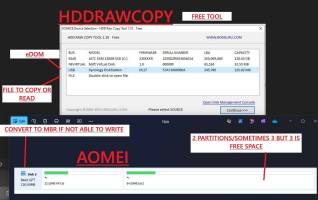
Yours. I won't worry about the eDOM. As you need to get this running first. And this NAS can boot without a eDOM. As it has 2 Boot Roms. Syno 1 and Syno2, Now the boot for Syno 2 is a Shell command line. If you connect serial port wise you will see it. As my pic in the previous post of showing ram size. You can enter commands with it too. So you don't need a eDOM to do that. The boot sequence for all 12 series and earlier models goes like this. At power on the system needs to see the 2 Boot ROMS. Syno 2 rom is setup to activate Syno1. There is a 3rd boot rom in some models too. But lets use the normal 2. So Syno2 is designed to activate Syno 1 if it sees it. Syno 1 is the eDOM. Or a USB drive. If it doesn't see it. It then ignores the loss, and proceeds to launch Syno 2 fully as a shell command. All NAS's after the 12 Series till today also follow this guideline, but do not have the Syno 2 Shell command ability. Synology removed that. So say you have a DS1522+, or a DS1815+, or even a rack system today. All have Syno 1 and 2. But do not activate Syno 2 command line. It just stalls and no boot. Only yours and the earlier models had the ability to shell boot if the eDOM is bad or missing. It is a UBOOT recovery feature in some models no longer present in NAS's today. A Lot of things changed in the newer. Even WIFI dongles or wireless is no longer available today. Yours has it. But the 12/13 series was the end of fun tinkering. Because Synology kinda caught on to knowing people were also tinkering with this to get their NAS;s fixed. LOL! They don't want these fixed. Or they make no money.
 
Besides. Do you see 100's of these a year and how they run compared to what you read? Are you a Synology service center? When you do what I do. You see it all.
We discussed this topic years ago in a thread exceeding 30 pages and tested all available RAM manufacturers and types. Everyone who uses their Synology as an application server too, and not just as an external USB hard drive, has noticed this.
 
We discussed this topic years ago in a thread exceeding 30 pages and tested all available RAM manufacturers and types. Everyone who uses their Synology as an application server too, and not just as an external USB hard drive, has noticed this.
I can understand what you're saying. I don't know how technical the the people in the 30 pages are. And it is possible the cases you ran into had this issue and was drawing people with the same problem. As those who have it working won't be posting there. And I don't do all 412+'s with 4g. And each one is tested prior top leaving to make sure it is fully functional. I will admit. I had a couple who could not do this. With very high CPU usages. But the most successful ones were still on DSM 5. And yours may have been all on the latest. DSM6 for this model. Synology is very sneaky. When they catch on to public forum posts of what can be done. A memo is sent across developers to make changes to a patch or newer DSM to limit the abilities of the NAS. I can almost guarantee your group was all on DSM6. Synology is infamous for taming the best when they catch on. And with hardware too i updates. As you will see bios files in those PAT files.
 

Create an account or login to comment

You must be a member in order to leave a comment

Create account

Create an account on our community. It's easy!

Log in

Already have an account? Log in here.

Similar threads

  • Question Question
From what I understand, Vitaliy used the file from Elextrixman and loaded the bios.ROM from the .PAT file...
Replies
1
Views
30
Hi, I suggest you to check the voltage at the coils (big square labelled R56, 4R7, ...). You should find...
Replies
45
Views
1,649

Thread Tags

Welcome to SynoForum.com!

SynoForum.com is an unofficial Synology forum for NAS owners and enthusiasts.

Registration is free, easy and fast!

Back
Top