
I got here with this program:Alcor Change PID_VID Rework 1.0.0.2But that's all, I can't change Device Vendor and Device Name. The flash drive changed in this way is not enough to boot the system from a USB stick. I want to ask if I need to make any settings in the OS of the ds1512+ or does it automatically recognize the boot device.

Install the app
How to install the app on iOS
Follow along with the video below to see how to install our site as a web app on your home screen.

Note: This feature may not be available in some browsers.
You are using an out of date browser. It may not display this or other websites correctly.
You should upgrade or use an alternative browser.
You should upgrade or use an alternative browser.
Question DS412+ not booting: serial console shows EFI Internal Shell missing boot devices, but EFI partition on internal storage seems intact
- Thread starter Orditivi
- Start date
- Latest activity Latest activity:
- Replies 344
- Views 54,652
B
Birdy
But, only blue light is blinking so, no HDDs....Of course, any power supply unit can fail, especially after such a long time. But as long as an LED on the device is still flashing blue, I would suspect the cause of the fault elsewhere.
Anyway, it's your call.

- 122
- 29
- NAS
- DS209+, DS411, DS415+ (modded into RS1219+) , DS116, DS220J, DS1821+
- Operating system
- Linux
- Windows
- Mobile operating system
- Android
- iOS
I got here with this program:Alcor Change PID_VID Rework 1.0.0.2But that's all, I can't change Device Vendor and Device Name. The flash drive changed in this way is not enough to boot the system from a USB stick. I want to ask if I need to make any settings in the OS of the ds1512+ or does it automatically recognize the boot device.
View attachment 22433
The VID/PID of F400/F400 should be sufficient.
Did you remove the DOM before booting from the USB?
Device Vendor: GenericThe VID/PID of F400/F400 should be sufficient.
Did you remove the DOM before booting from the USB?
Device Name: Mass Storage
Device Revision: 0100
This hasn't been changed, maybe that's the problem.
- 122
- 29
- NAS
- DS209+, DS411, DS415+ (modded into RS1219+) , DS116, DS220J, DS1821+
- Operating system
- Linux
- Windows
- Mobile operating system
- Android
- iOS
You came out right Ragnarok. The device loaded the USB flash drive on the first channel, but the loading is very slow, more than 5 minutes, which is a bit strange, because the flash drive is very fast. But this is a start, now I will order a new DOM and I will do it properly. I am amazed that I searched for two days MPTool for this flash drive, and finally with this elementary program I changed VID & PID Alcor Change PID_VID Rework 1.0.0.2.But this is only for Alcor chips. Thank you very much for your time, tomorrow I will upload pictures of what is happening with my ds1512+To my knowledge the vendor and device names should not be significant. Try and and establish a serial connection and a terminal session, so that you can see what is going on. Eventually try another flash drive with a different controller
- 122
- 29
- NAS
- DS209+, DS411, DS415+ (modded into RS1219+) , DS116, DS220J, DS1821+
- Operating system
- Linux
- Windows
- Mobile operating system
- Android
- iOS
Hello everyone again, I managed to restore my server ds1512+. I attach pictures of the recovery steps. Thanks to ragnarok for the invaluable advice. I haven't put the disks in yet and I'm testing with temporary two disks, but I'm sure everything will be fine.View attachment 22437
Awesome news, Nilfe ;-) Looks like you will be all good…

- 18
- 3
- NAS
- DS1512+
- Operating system
- Windows
- Mobile operating system
- Android
- iOS
I have just completed my detailed ‘German-language’ repair instructions and would like to make them available to you here. I hope this is OK:

 sfreakblog.wordpress.com
Thanks again for your support.
My NAS runs and runs and runs...
Have a nice weekend and best regards from Germany/Saxony
arcade
Nimbus2000, oder wie man einen Hexenbesen entstört…
Ohne Frage handelt es sich bei dem „Nimbus 2000“ um einen sehr bekannten Renn-Hexenbesen: Seine „genialen“ und überzeugenden Flugeigenschaften veranlasste unzählige kommerzi…
sfreakblog.wordpress.com
Thanks again for your support.
My NAS runs and runs and runs...
Have a nice weekend and best regards from Germany/Saxony
arcade

- 157
- 16
- NAS
- ALL MODELS
- Operating system
- Linux
- macOS
- Windows
- other
- Mobile operating system
- Android
- iOS
Last edited:
Just PID/VID is al you need to do. F400 or F401 for external USB boot. That video is a guy who steals all my info. He even had NAS's sent here to have me fix. And he just puts it online. what fix I applied What a crooked person he is.
He's a TV repair guy. Who steals other peoples info to make videos with.

He's a TV repair guy. Who steals other peoples info to make videos with.
- 122
- 29
- NAS
- DS209+, DS411, DS415+ (modded into RS1219+) , DS116, DS220J, DS1821+
- Operating system
- Linux
- Windows
- Mobile operating system
- Android
- iOS
I have just completed my detailed ‘German-language’ repair instructions and would like to make them available to you here. I hope this is OK:
Nimbus2000, oder wie man einen Hexenbesen entstört…
Ohne Frage handelt es sich bei dem „Nimbus 2000“ um einen sehr bekannten Renn-Hexenbesen: Seine „genialen“ und überzeugenden Flugeigenschaften veranlasste unzählige kommerzi…
Thanks again for your support.
My NAS runs and runs and runs...
Have a nice weekend and best regards from Germany/Saxony
arcade
Nice German wrap-up, Arcade.The screenshots and illustrations on do’s and don’ts will for sure be helpful.
When fitting a 9-pin DOM connector to a 10-pin socket, my quick and dirty would have been to Dremel a tenth hole in the DOM connector, rather than axing a pin ;-)
Ideally those small 9-pin (low profile) connectors should be replaced by normal height 10-pin connectors. So while you are shopping for DOMs already, you could add some normal height SMD SMT 2*5 PIN double row FEMALE PIN HEADER 2.0MM PITCH Connector Sockets, it’s only 1.5 USD extra for a bag of 10 pcs. With a dash of solder paste and flux, that connector is quite quickly replaced in minutes…
- 18
- 3
- NAS
- DS1512+
- Operating system
- Windows
- Mobile operating system
- Android
- iOS
Hi Ragnarok, I had already read the tip about drilling into the plug here in the thread, but I have to honestly say that at the time of the DOM installation I was not at all convinced that my Synology could ever work again. And yes, I was a bit impatient, I just wanted to get it done and end this mess in my living room.
I figured if the PIN from the eDOM wasn't needed anyway, I might as well remove or shorten it. If the repair with the Chinese USB module hadn't worked, the 13-year-old box would have ended up in the bin anyway and I would have bought a new system. But what I will do is take your advice and copy it, hopefully with your permission, 1:1 to the right place in my post.
@Elextrixman: Is it these videos or is it the following YT-ContentCreator who earns money with your information:
View: https://www.youtube.com/watch?v=xpV5ydNdxHg
Before I found my way to you, I inevitably came across his videos.
Have a nice Sunday and best regards
/arcade
I figured if the PIN from the eDOM wasn't needed anyway, I might as well remove or shorten it. If the repair with the Chinese USB module hadn't worked, the 13-year-old box would have ended up in the bin anyway and I would have bought a new system. But what I will do is take your advice and copy it, hopefully with your permission, 1:1 to the right place in my post.
@Elextrixman: Is it these videos or is it the following YT-ContentCreator who earns money with your information:
View: https://www.youtube.com/watch?v=xpV5ydNdxHg
Before I found my way to you, I inevitably came across his videos.
Have a nice Sunday and best regards
/arcade
- 157
- 16
- NAS
- ALL MODELS
- Operating system
- Linux
- macOS
- Windows
- other
- Mobile operating system
- Android
- iOS
Last edited:
Hi Ragnarok, I had already read the tip about drilling into the plug here in the thread, but I have to honestly say that at the time of the DOM installation I was not at all convinced that my Synology could ever work again. And yes, I was a bit impatient, I just wanted to get it done and end this mess in my living room.
I figured if the PIN from the eDOM wasn't needed anyway, I might as well remove or shorten it. If the repair with the Chinese USB module hadn't worked, the 13-year-old box would have ended up in the bin anyway and I would have bought a new system. But what I will do is take your advice and copy it, hopefully with your permission, 1:1 to the right place in my post.
@Elextrixman: Is it these videos or is it the following YT-ContentCreator who earns money with your information:
View: https://www.youtube.com/watch?v=xpV5ydNdxHg
Before I found my way to you, I inevitably came across his videos.
Have a nice Sunday and best regards
/arcade
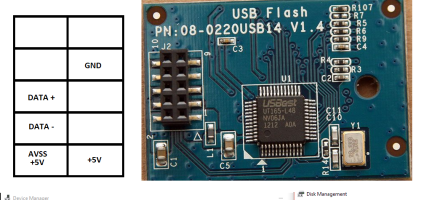
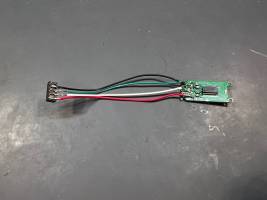
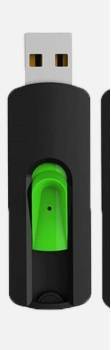
Yes. In fact had units sent here to publish my info. And incorrectly. Is bad. I can help you all you want. I even have had USB thumb drives I converted for this too to work. As eDOM's can be hard to find. There is a vendor on ebay to buy these. 10PCS MICRON 2GB 9-Pin USB Flash Drive DOM USB (Small | eBay. And all you have to do is just change the PID/VID to F400, Then Synology will see the device. As in pic you can see why its really a USB thumb drive. Now these you have to use the tool to change the pid/vid to F400. And copy your old file over. That's all. You can also use this pic to connect to your pc. And read the dom with HDDGURU's tool called HDD RAW COPY. Its what I use here to transfer over the file from a bad dom to new after I changed the pid/vid on it. Sorry for being late. Got sick for awhile. Also attached a cheap ebay $2 thumb drive I tested working. But you have to get high speed ones. As timing is important with these too. Just get anything that is 150meg or more. Change pid/vid to f400. And solder in. You now have a home made dom for pennies. I do alot of experimenting too. And this was one of them
Attachments
- 157
- 16
- NAS
- ALL MODELS
- Operating system
- Linux
- macOS
- Windows
- other
- Mobile operating system
- Android
- iOS
YesI connected USB daughter board to PC and it said "USB device not recognized" Does it mean controller dead?
- 157
- 16
- NAS
- ALL MODELS
- Operating system
- Linux
- macOS
- Windows
- other
- Mobile operating system
- Android
- iOS
- 157
- 16
- NAS
- ALL MODELS
- Operating system
- Linux
- macOS
- Windows
- other
- Mobile operating system
- Android
- iOS
Last edited:
You can if you want. Remove the eDOM if you own a 2013 or earlier model. And get some cheap USB thumb drive. And change the pid/vid on the thumb drive to F400. Copy your eDom over to the USB thumb drive. The thumb drive controller utilities are all located at usbdev.ru after you know what controller is on that usb thumb drive with chip genius Util. Copy over using HDDRAWCOPY. Now after that Plug it in the back of the NAS. And it will boot. Now your eDOM is a USB thumb drive in the back of the NAS. I do this for many customers here who like switching DSM's. Some like the DSM7/DSM6 to be swappable., Only on the 13 Series and some 12 series you can run DSM 7 on. Like racks. Or you can hybrid a PAT file to make your older 12 series NAS a 13 series newer NAS. Series is the last 2 digits of you model. Which also is the year of that model. So much you can do to mod these boxes.If not recognized controller hasn't sent the PID/VID F400 to the Device Name in the Device manager. The PID/VID resides in the controller chip.
- 157
- 16
- NAS
- ALL MODELS
- Operating system
- Linux
- macOS
- Windows
- other
- Mobile operating system
- Android
- iOS
By the way there is a secret that works sometimes with this issue you can do. Heat the edom and see if the pc sees it. If not. Cool it in the fridge for 10 mins, and then see id it sees it. 90% will read with this done. But you have to move fast before the temp settles on the eDom. Or its controller will drop off again.I connected USB daughter board to PC and it said "USB device not recognized" Does it mean controller dead?
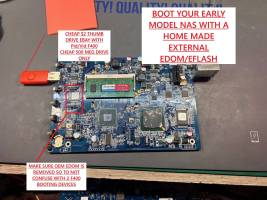
I pretty much created all this here for you guys. Long ago.
So you can also for this. But you need a copy of you edom you stored somewhere. Or that you got it off you edom now.
You can use a plain old USB thumb drive to do the same. See pic how to and read below.
Attachments
Similar threads
- Question
From what I understand, Vitaliy used the file from Elextrixman and loaded the bios.ROM from the .PAT file...
- Replies
- 1
- Views
- 35

Hi,
I suggest you to check the voltage at the coils (big square labelled R56, 4R7, ...).
You should find...
- Replies
- 45
- Views
- 1,650


