Install the app
How to install the app on iOS

Follow along with the video below to see how to install our site as a web app on your home screen.

Note: This feature may not be available in some browsers.

DSM Update Version: 7.2.2-72806 Update 4

Last edited:
Silly boy! It’s the Opposite!
They are watching My Schedule!
Every time I leave town they release a security update!
This one (DSM) is just a larger package than usual!

Guess who always has the last post?
 
Oh this is laughable.
I stand by my prior statements.
I’m going to try a second location prior to posting in depth comments.
 
Last edited:
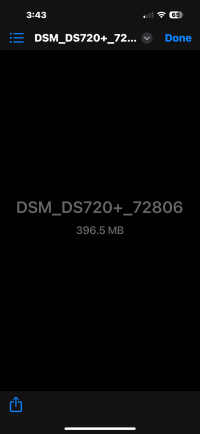
Went out for breakfast. WIFI. Asked if I could try large download. OK. 356MB.
Downloaded 7.2.2-4 PAT file. 4-5 min. Ok. Via DS FINDER, Desktop, did manual update!
15-20 min into upload, no upload % indicated… Upload ceases and Update says the -3 is Current!
Manager asks ‘How is it goin’?” Failed!
So he writes down his private login & Password! “Far Faster!”
To make sure, deleted and re-downloaded PAT File again, far faster, still 356MB, then manual update a 2nd time.
20-25 min later….. Upload ceases again - and again, it says that -3 is latest update!!

I Stand by my prior comments: manual update on DS FINDER — Via remote connection, via: Mobile /Desktop: Does Not Work!

I await email from NAS indicating an update is available…. Which will download and update from the NAS, as opposed to a remote connection.

I would appreciate anyone in USA that receives an email from their NAS about this update to post here, so I would have a heads up that USA Release has occurred!
Thank You!

OK Birdy, get your post in!
 
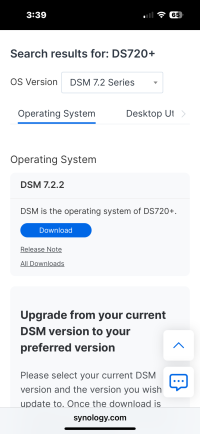
This download page:
 

Attachments

  • IMG_0609.png
    IMG_0609.png
    363.9 KB · Views: 54
Here is how it appears:
 

Attachments

  • IMG_0610.png
    IMG_0610.png
    170.8 KB · Views: 41
This thread
This download page:

And did you click download? Which would be a full version download... :oops:

Or did you scroll down to upgrade, enter your existing version and then download the update which would not be a full version download :rolleyes:

Ridiculous
 
That’s probably why I always waited for NAS to report an upgrade, and it never worked before. So: don’t believe Upgrade site.

So, 3rd request:
USA user’s who get update report from NAS. please post so I know it’s coming!
 
Last edited:
Birdy: fredbert: Gerard: You were correct!
I was using wrong download. This was the First time I ever did a manual update - remotely, via DS FINDER: Which involves the user selecting the correct file…. as opposed to awaiting for NAS to point at correct file for me. (The release..)
Therefore - I Was not aware that there were 2 different versions of Same version file. I thought that since I was looking for, and found: 7.2.2-4 for the NAS in question….. That was: “good enough”….
Nope! There are 2 of them! And as luck would have it, I Chose The Wrong One!
My incredibly Bad….
 
Last edited:
Now that update has been accomplished…..
I can report some information that was seen during manual file upload, that explains why multiple NAS’s report online or offline from within DS FINDER on the multiple NAS selection screen — at differing times:
During the upload of the selected manual update file, remotely, within DS FINDER: it displays the name of the Synology Server being connected to, at that time, during the upload. The different NAS’s - all at same location, using different QC addresses - used different Synology servers, that reacted at slightly different speeds, and times.
My ‘Experimental’ 720+ used: usa5
My Main 720+ used: usa6
My 718+ used: usa3
These are partial Synology server names,
 
Nothing major, but..
Since 7.2.2-4 I’m seeing notification reports numbers attached to DS FINDER, that, seemingly from one NAS, that, when notifications are read. Don’t de-number the notification number attached to DS FINDER APP (IOS 18.6).. to remove the notification number (In this case: 2 ), attached to APP, I actually found it not being erased until I went into a DIFFERENT NAS, log off one with 2, login into other NAS SHOWING 4 notifications! Then - those 4 notifications were silenced, the notification number (2) attached to DS FINDER ICON finally went away. !!
This was seen both yesterday and today. I don’t recall this being as prevalent on 7.2.2-3.
$.02
 
How can I successfully downgrade to Update 3?

My NAS was working fine updated it last night now it's broken as F....... I can't access any files
 
How can I successfully downgrade to Update 3?

My NAS was working fine updated it last night now it's broken as F....... I can't access any files
There is no official way to downgrade, and lately, it has several caveats with it, so it is an absolute last resort to consider it. I strongly encourage against it, and it would be best to try and figure out what the actual problem is to fix it.

If you are keen on downgrading, the method has not changed for the past 15+ years:

I can't access any files
Can you elaborate a bit more? Maybe open a separate thread so we can all discuss it there?
 
There is no official way to downgrade, and lately, it has several caveats with it, so it is an absolute last resort to consider it. I strongly encourage against it, and it would be best to try and figure out what the actual problem is to fix it.

If you are keen on downgrading, the method has not changed for the past 15+ years:


Can you elaborate a bit more? Maybe open a separate thread so we can all discuss it there?
Thanks Rusty for the suggestions.....

Been a process but so far I have managed to troubleshoot some problems. Also submitted a ticket so that Synology support can assist. So far I have internal access via a web browser to the DSM fully. Three packages said they couldn't start. Those being Container Manager / File Station / Synology Application Service. After giving access remotely to Synology I kept getting some email notification saying there was a certificate error. Something to do with quickconnect - I have renewed it and it fixed it.

I have managed to fix all three packages that couldn't start with the repair all.

But not I can't see my NAS in Windows file managed as mapped network drives.....

Not sure how to start up a new thread and it's probably not really needed but still trying to troubleshoot the rest without having to reboot the NAS and my system.
 
Last edited:
I did try connecting remotely to 7.2.2-4 via DS FILE (even the beta) and no issues.
I will try again, but storm took out entire development’s internet. Neighbors say Awaiting Zito repairman to Ibe sent there to repair.

Update: 2600 Router PUNCH DRUNK Again!
Neighbor power cycled 3600 and 20 min later tested. Remote connection returned, and I can access files remotely. File Station via DS FINDER or beta DS FILE.
 

Create an account or login to comment

You must be a member in order to leave a comment

Create account

Create an account on our community. It's easy!

Log in

Already have an account? Log in here.

Popular tags from this forum

Similar threads

  • Sticky
Upgraded DS916+ to Version: 7.4-90075 no issues found.
Replies
28
Views
1,444
I did the update on teh 2423RP+ and 1821+, both seemed to reboot fine and have run for 24 hours with no...
Replies
3
Views
1,461
Revisit an hour or more later. No subsequent issues. All at -2: are working fine Just to be a bit anal...
Replies
9
Views
1,976
I installed the update on my hoard of nas devices. If you have a lot of users (9000+ in my case) and a...
Replies
9
Views
2,212
First post, just joined a few minutes ago. A few weeks ago, I was on Synology's website and saw that DSM...
Replies
11
Views
3,567
Awoke to find another 7.3.1-1 Roll Out awaiting on 718+. (Yesterday verified second 7.3.1-1 worked with...
Replies
17
Views
1,789
Hours later, without Hybrid Share & Active Update. All 3 still fine! 718+, on it’s last update still has...
Replies
11
Views
2,174

Welcome to SynoForum.com!

SynoForum.com is an unofficial Synology forum for NAS owners and enthusiasts.

Registration is free, easy and fast!

Trending content in this forum

Back
Top