Install the app
How to install the app on iOS

Follow along with the video below to see how to install our site as a web app on your home screen.

Note: This feature may not be available in some browsers.

Virtual DSM (vDSM) practical application

265
24
NAS
vDSM via Docker, RS3621xs+, RS816, DS715 modded to DS1517, DS116, SA6400, N4810, N2810
Operating system
  1. Linux
  2. other
Mobile operating system
  1. Android
  2. iOS
vDSM is attracting notable attention, partly because its modern implementation via Docker bypasses any hardware limitations imposed by the manufacturer.

Whether using VMM or Docker, the resulting experiences are something I would like to share here.
 
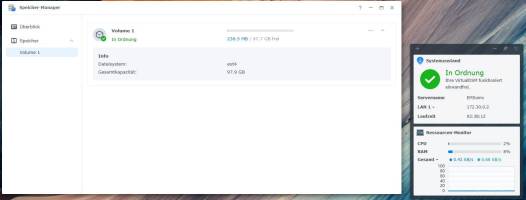
Performance consideration: Avoiding nested Copy-on-Write performance degradation on a Btrfs or ZFS filesystem.

By default, vDSM creates a Btrfs volume1. To avoid this performance penalty, it is necessary to switch to at least ext4.
 
Last edited:
Today I managed a migration to ext4 for volume1. I see two ways to do this.

According to the AI recommendation, disable Btrfs:
Bash:
sed -i 's/support_btrfs="yes"/support_btrfs="no"/g' /etc.defaults/synoinfo.conf


However, I fear that this causes the volumenumber after reboot to increment to an undesirable value, for which I know of that no remedy.


I handled it cleanly by deleting and recreating the data partition:

Script 1: Delete existing partition & reboot

Bash:
#!/bin/bash

# Definition of the target drive
DRIVE="/dev/sdb"

echo "Deleting partition 1 on $DRIVE..."

# Fdisk automation for deleting
fdisk "$DRIVE" <<EOF
d
1
w
EOF
echo "Partition successfully deleted."

echo "System will reboot in 3 seconds..."
sleep 3

echo "Reboot the system now..."
reboot

Script 2: Create new partition & keep signature & reboot

Bash:
#!/bin/bash

# Definition of the target drive
DRIVE="/dev/sdb"

echo "Creating new partition 1 on $DRIVE and keeping the signature..."

# Fdisk automation for creating
fdisk "$DRIVE" <<EOF
n
p
1


n
w
EOF

echo "Partition /dev/sdb1 successfully created (signature was kept)."

echo "Formatting /dev/sdb1 with ext4 file system..."

# Formatting the newly created partition
mkfs.ext4 -F "${DRIVE}1"

echo "File system ext4 successfully created on ${DRIVE}1."

echo "System will reboot in 3 seconds..."
sleep 3

echo "Reboot the system now..."
reboot
 

Attachments

  • vDSM with ext4 volume1..JPG
    vDSM with ext4 volume1..JPG
    59.5 KB · Views: 3

Create an account or login to comment

You must be a member in order to leave a comment

Create account

Create an account on our community. It's easy!

Log in

Already have an account? Log in here.

Similar threads

  • Question Question
So what exactly does MA transfer? One benefit of doing the parallel setup and manual config is that I can...
Replies
2
Views
247
  • Solved
Thank you Telos. I unplugged the external HD after my initial post and then left for a few hours. I...
Replies
2
Views
1,265
  • Question Question
[Apologies in advance, this is a cross post from the official synology community forums, but SynoForum...
Replies
0
Views
456

Welcome to SynoForum.com!

SynoForum.com is an unofficial Synology forum for NAS owners and enthusiasts.

Registration is free, easy and fast!

Back
Top