- 265
- 24
- NAS
- vDSM via Docker, RS3621xs+, RS816, DS715 modded to DS1517, DS116, SA6400, N4810, N2810
- Operating system
- Linux
- other
- Mobile operating system
- Android
- iOS
Follow along with the video below to see how to install our site as a web app on your home screen.
Note: This feature may not be available in some browsers.
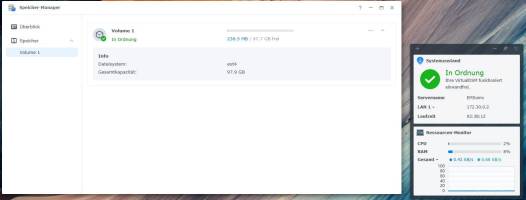
sed -i 's/support_btrfs="yes"/support_btrfs="no"/g' /etc.defaults/synoinfo.conf
#!/bin/bash
# Definition of the target drive
DRIVE="/dev/sdb"
echo "Deleting partition 1 on $DRIVE..."
# Fdisk automation for deleting
fdisk "$DRIVE" <<EOF
d
1
w
EOF
echo "Partition successfully deleted."
echo "System will reboot in 3 seconds..."
sleep 3
echo "Reboot the system now..."
reboot
#!/bin/bash
# Definition of the target drive
DRIVE="/dev/sdb"
echo "Creating new partition 1 on $DRIVE and keeping the signature..."
# Fdisk automation for creating
fdisk "$DRIVE" <<EOF
n
p
1
n
w
EOF
echo "Partition /dev/sdb1 successfully created (signature was kept)."
echo "Formatting /dev/sdb1 with ext4 file system..."
# Formatting the newly created partition
mkfs.ext4 -F "${DRIVE}1"
echo "File system ext4 successfully created on ${DRIVE}1."
echo "System will reboot in 3 seconds..."
sleep 3
echo "Reboot the system now..."
reboot
We use essential cookies to make this site work, and optional cookies to enhance your experience.