Follow along with the video below to see how to install our site as a web app on your home screen.
Note: This feature may not be available in some browsers.
I know. I don't know why it started this. So what I'll do, as I'm gonna stay up longer for a support call. I will leave the page open. This way I see it live. Wonder if my browser cache is over loaded for some reason, and pulling up recent pages prior. I'll check it now.That prevents a consolidating thoughts into a single post.
Oh Man. Now I see why! LOL! I have 2 desktops open on my pc. And I forgot to close the other one. So its keeps jumping me past or prior posts. LOL!Apparently that is no more working.
Yes, the 818+ Rackstation caught fire under the motherboard, just between the main board and the storage back plane, during shutdown, just after the 2-year warranty expired. I requested a quote for a new board from Synology, but they suggested I have to by a new Rackstation, and this after only two years and a few days.Maybe the case you ran into. And they have bad power AC filtering on the 220v network. Like for the 818+. But when you see 100's of these annually. Its a different story. The 818+ rack always gets burnt U50 U43, and i forgot the name of the other one. And the PSU's in them I upgrade to 200watt. On 412. It can happen if the eDOM is already very weak after a decades of use. With that I will agree. Like 412. Yea. That is in use alot! In fact I see some run 24/7/365. And they never boot again after running for 10 years. And the owner powers it down. As the eDom dies in it. But is in memory until the NAS powers down and needs to be reloaded on every boot.
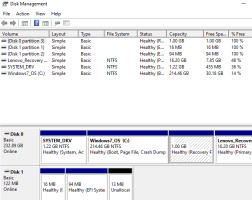
Sorry, my bad. I swapped D+ and D- and it appeared in Device manager as "Synology Diskstation USB Device". In Disk Manager it shows 3 EMPTY partitions. Does it mean it is wiped?If not recognized controller hasn't sent the PID/VID F400 to the Device Name in the Device manager. The PID/VID resides in the controller chip.
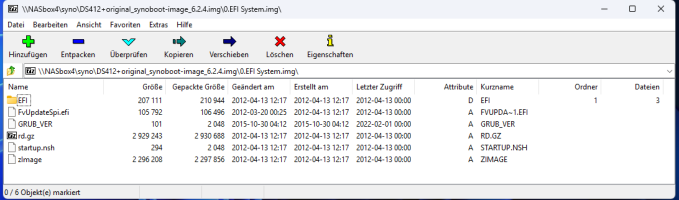
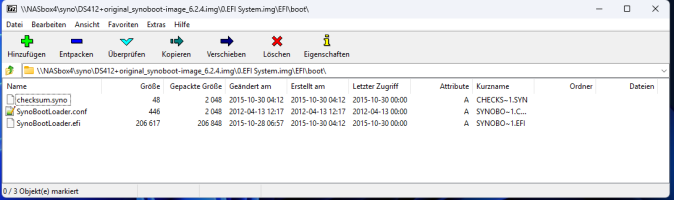
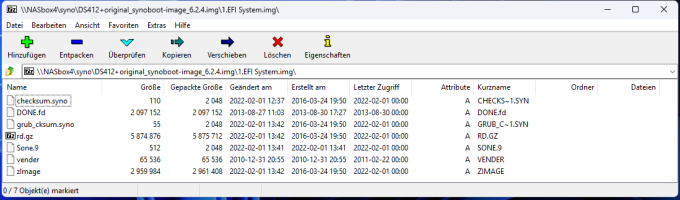
No, and you have to look into the partitions file system using Linux driver. I always take an image and view it with 7zip.Sorry, my bad. I swapped D+ and D- and it appeared in Device manager as "Synology Diskstation USB Device". In Disk Manager it shows 3 EMPTY partitions. Does it mean it is wiped?
I was right then. As you said DOMs. DOMs never on 818+. That burn is from the 2 of the 3 chips I mentioned. Very common. Why I said. That is the only thing that goes wrong with this board. And the PSU. And 100ohm. The PSU is what caused the burn. As it gets weak over time. And the balance for current changes alot to a point more stress on these 3 chips is really bad. 2 Chips on the bottom. 1 on TOP. U43 on top, U49, and U50 Bottom, And they get so hot they burn holes in the board. Its fixable if you know the circuit layout. And the chip didn't destroy the cladding in the board.Yes, the 818+ Rackstation caught fire under the motherboard, just between the main board and the storage back plane, during shutdown, just after the 2-year warranty expired. I requested a quote for a new board from Synology, but they suggested I have to by a new Rackstation, and this after only two years and a few days.
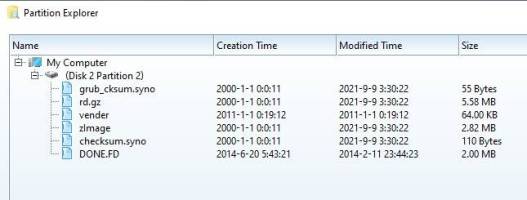
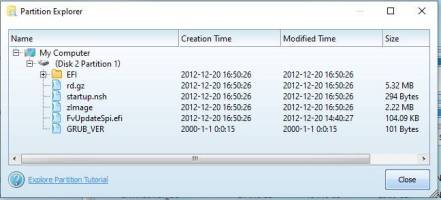
I could see content of disk using recommended software. Looks fineNo, and you have to look into the partitions file system using Linux driver. I always take an image and view it with 7zip.
Also try "MiniTool Partition Wizard Free 9.1" for this. Normally, files on the second partition are also corrupted.
The primary task is to replace the DoM hardware. We can help with the data on it.
Yes, looks well. Here is my overview in comparison:I could see content of disk using recommended software. Looks fine
Check the output of "Temple.exe". If it only shows a USB 1.x connection, that's insufficient, and the hardware needs to be replaced.May I ask why do you think I have issue with hardware is flash drive is reading fine? Why do I need to replace board or controller chip?
That looks okay. However, it could be on the verge of becoming unsafe due to age and fluctuate.USB Mass Storage Device Synology-Diskstation-130301f49c6506 Synology [0xF400] Diskstation [0xF400] High Speed - USB 2.0 [480Mb/s], Port: 1, Address: 10, Revision: 0x0100 USB\VID_F400&PID_F400\130301F49C6506
Well, the device isn't really worth the effort. It only runs with 1066MHz RAM!?Thanks. I will leave it for now as I cannot power it up anyway![]()
We use essential cookies to make this site work, and optional cookies to enhance your experience.